HeartSuite Firewall
A closed appliance that watches real traffic on this box, lets you approve a finite allowlist, and seals it. Prototype documentation.
HeartSuite Firewall | Prototype
Prototype: HeartSuite Firewall is under active development. Documentation reflects current design intent and is subject to change.
Overview: An inbound port that nobody approved is open by default. HeartSuite Firewall is the packet filter for traffic to and from a closed HeartSuite appliance: you observe real traffic, approve a finite allowlist, and seal it. The workload runs on the appliance image itself, and the filter judges packets by connection state.
Root Lock by HeartSuite is the hardened operating system under the filter, so execution, file access, and per-program outbound destinations stay under Root Lock’s control.
If execution control or per-program outbound allowlisting on an existing server is the requirement, stay with Root Lock and the OS or cloud inbound control already on that host. See Deployment scenarios for fit by environment.
Learn about HeartSuite Firewall
About this documentation
Covers the HeartSuite Firewall prototype. Root Lock remains the shipped kernel product, and what the Root Lock pages say about inbound traffic still applies to it.
1 - Inbound default-accept is the other Unix inheritance
Root Lock allowlists per-program outbound. HeartSuite Firewall is the host-path stateful filter for a closed appliance.
HeartSuite Firewall | Prototype
Overview: A listening service on a Linux host accepts inbound connections unless a packet filter refuses them. HeartSuite Firewall is that filter on a closed HeartSuite appliance: observe real traffic, approve a finite allowlist, seal it.
Root Lock controls outbound destinations per program, at the kernel, using literal IP addresses. The two products address different layers and are designed to be used together on the appliance image.
In this section
1.1 - A listener will accept a stranger by default
Inbound default-accept is a different OS assumption from Root Lock’s outbound allowlist. How HeartSuite Firewall addresses that hole.
Prototype: Content on this page reflects current design intent and will be updated as the product matures.
Overview: A process that is listening will accept a connection from anywhere the routing table can reach, unless a packet filter refuses the packet first.
Two different defaults
Root Lock by HeartSuite starts from one Unix inheritance: a program that can run may open files and make outbound connections as the user who launched it.
HeartSuite Firewall starts from the other: a listening process accepts connections from any routable address unless a packet filter refuses them first.
Those are independent controls. Approving 93.184.216.34 for /usr/bin/curl does not close port 22. Closing port 22 does not stop curl from calling an address you never reviewed.
What inbound default-accept enables
1. Unsolicited reachability
Any service that binds a port is reachable from every address that can route to the host. Installing the service rarely meant “the entire internet,” yet scanners, credential stuffing, and exploit kits treat that reachability as their starting condition.
2. Login and management planes on the filter itself
Campus and branch firewalls accumulated a second job: they became the remote-access concentrator and the administrative website. The packet filter then has to defend its own web VPN, SSO broker, and management GUI.
Incidents in 2024–2026 on Cisco Secure Firewall and FortiOS followed that surface. See Recent firewall campaigns.
3. Rules nobody can still explain
Stateful policy that is never observed, reviewed, and reduced becomes an any-any rule with exceptions stacked on top, so the filter is “on” but nobody knows what it allows.
Extra tools then appear to find which rules still matter.
What another NGFW blade answers
Application catalogs, TLS interception, URL clouds, and sandbox subscriptions answer one question: what is inside a flow you already decided to accept. Each of those blades adds policy surface, plus a management and update plane that has to stay reachable.
HeartSuite Firewall answers a different question: which inbound sockets on this box a human approved, and whether that set is sealed. It leaves payload inspection to those specialist tools, keeps inspection stateful, and ships as a closed image that you administer from the Dashboard on the console or serial console.
What Root Lock already covers
Under Lockdown, Root Lock blocks outbound connections to destinations that are not on a program’s allowlist, including from processes running as root. The kernel enforces that per program; inbound port policy is HeartSuite Firewall’s job.
At Lockdown, Root Lock itself records only minimal inbound rules: SSH scope and accept-only permits for named services. Observing real traffic, reviewing an allowlist for this box, and sealing it with Firewall Lockdown are what HeartSuite Firewall adds.
The result is a smaller remotely reachable surface. A port you approved still accepts the traffic its rule allows, a seal that is too wide stays that wide until you narrow it through Maintenance, and the hypervisor console stays inside the trust boundary. See Protection limits.
1.2 - Observe real traffic, approve a list, seal it
Host-shaped stateful filter on a closed appliance: observe real traffic, approve a finite allowlist for this box, then seal it. Root Lock is the OS under the filter.
Prototype: Content on this page reflects current design intent and will be updated as the product matures.
Overview: A listening service on a general-purpose host accepts inbound packets unless a filter refuses them. That is the Unix default this product closes.
HeartSuite Firewall is a host-shaped stateful packet filter delivered as a closed HeartSuite appliance image, with Root Lock by HeartSuite as the hardened OS under it. The Dashboard shows traffic as it happens, you approve a finite allowlist for this box’s inbound and outbound path, and Firewall Lockdown seals that set.
The filter judges packets by connection state on Linux netfilter’s nft path. Execution, file access, and per-program outbound destinations remain with Root Lock, the kernel under the filter.
What you receive
You receive a virtual appliance (QCOW2 or OVA). Hardware follows later, after real deployments, and keeps the same inspection class.
The image is closed:
- A custom Root Lock kernel is already the operating system.
- The packet filter is already installed and constrained by that kernel.
- You reach the box on the console or serial console. There is no public administrative SSH by default, and no Docker runtime.
- HeartSuite is the update authority, so once the allowlist is sealed the filter fetches no rules or reputation data from a public CDN.
The closed image is the only delivery. Install scripts that appear in development trees layer the prototype onto a test guest for laboratory use only.
What the filter decides
HeartSuite Firewall is a host-shaped stateful firewall.
- Host-shaped. It filters traffic to and from this box. The workload runs on the image.
- Stateful. Allow and deny follow connection state, not a stateless access list alone.
- Literal addresses. Critical rules use IP addresses rather than hostnames, so a DNS answer never decides what the filter allows.
Inspection is limited to connection state against the sealed allowlist. Application payload inspection, TLS termination for classification, and URL or sandbox clouds are outside the product by design; Protection limits names the tools that cover them.
Observation, approval, and Firewall Lockdown
You use the same observe → approve → seal path Root Lock already uses for programs and destinations:
observe what is real → approve what is necessary → seal what was earned.
| State | Trust | What you see |
|---|
| Observing | Traffic is logged so you can teach the allowlist. Rules are not fully enforced. | The system strip reports traffic observation. Pending events accumulate on Firewall Rules. |
| Reviewing | You decide. The Dashboard does not auto-approve. | Each event shows service, port, origin, and attempts. Approve creates an allowlist entry. Skip defers. |
| Firewall Lockdown applied | Trust is withdrawn from anything that is not on the sealed set. | After you type YES and reboot the host yourself (the Dashboard does not reboot it), the keys that change rules are gone. The strip is quiet when the seal and Root Lock Lockdown are both in place. |
| Maintenance | You deliberately reopen the box to change policy. | Maintenance is the only supported change path. You re-observe if needed, then seal again. |
Firewall Lockdown and Root Lock Lockdown are paired on the appliance: Firewall Lockdown seals the packet allowlist, and Root Lock Lockdown seals the kernel allowlist (programs, files, outbound destinations). After the seal, changing either one goes through Maintenance.
What stays on Root Lock
| Control | Product |
|---|
| May this program execute? | Root Lock |
| Which files may it read or write? | Root Lock |
| Which outbound IP may this program reach? | Root Lock |
| Which packets may this box accept or send? | HeartSuite Firewall |
| Is the chosen packet allowlist sealed? | HeartSuite Firewall (Firewall Lockdown) |
See Network and Remote Access for Root Lock’s outbound queue, and Protection limits for what the packet boundary leaves to other tools.
1.3 - Where the packet boundary holds
HeartSuite Firewall’s packet boundary, residuals, and which tool to put beside it for those gaps.
Prototype: Content on this page reflects current design intent and will be updated as the product matures.
Overview: A listening service accepts packets from anywhere the routing table can reach, unless a filter refuses them. Under Firewall Lockdown, HeartSuite Firewall refuses traffic to and from this box that is not on the sealed allowlist — including traffic aimed at services running as root.
An attacker who uses a port you approved is limited to what that rule allows, and what they send over that port is for a WAF and Root Lock to constrain.
An attacker uses a service you already approved
The scenario. You approved inbound HTTPS to the workload on this image. An attacker exploits a bug in that web application over the allowed port.
What HeartSuite Firewall does. Packets to ports that are not on the sealed allowlist still fail, so scanners probing closed ports get nothing, and a listener the attacker starts on a port outside the allowlist gets no inbound path.
What it does not cover. The filter does not judge application content on a port you approved. A listener that binds one of the ports the image already leaves open to any source is reachable too, because that port is already an approved path.
A WAF, application hardening, and Root Lock by HeartSuite (what that process may execute, read, write, and call outbound) address the blast radius inside the approved service.
Outbound destinations per program
The scenario. A compromised approved program opens an outbound connection to an address you never reviewed.
What HeartSuite Firewall does. The connection still has to pass the sealed host filter, which applies to traffic leaving this box independently of per-program outbound policy.
What it does not cover. The host filter has no per-program destination rules. Which program may reach which literal IP stays with Root Lock.
Traffic through this box to another server
The scenario. You want to place the appliance in front of a backup server or a subnet and publish NAT or forwarded ports.
What HeartSuite Firewall does. v1 filters INPUT and OUTPUT of this image, because the workload is meant to run on the image.
What it does not cover. v1 has no FORWARD or NAT path, so keep the existing edge firewall in front of other hosts. See Deployment scenarios.
Application identification, TLS interception, and URL clouds
The scenario. A buyer expects App-ID, TLS man-in-the-middle, URL categories, sandbox detonation, or SD-WAN on the same appliance.
What HeartSuite Firewall does. It filters on connection state against the allowlist you sealed.
What it does not cover. App-ID, TLS interception, and URL clouds are outside the product, so keep the specialist tool for that inspection.
Physical access and the console
The scenario. Someone who can reach the serial console or the hypervisor console boots Maintenance and removes the seal.
What HeartSuite Firewall does. Under Firewall Lockdown, an attacker who already has remote root cannot rewrite the sealed allowlist. Change goes through Maintenance on the console.
What it does not cover. Whoever holds the serial console, a cloud serial console, or the hypervisor can boot Maintenance and change the allowlist, so restrict console access in the hypervisor or cloud IAM.
A later hardware appliance takes the hypervisor out of that path, while physical presence at the box remains a console path. See Architecture and compatibility.
An allowlist that is too wide
The scenario. Observation ran on a noisy network, a broad rule was approved to “make it work,” or the image already opened ports to any source, and then that set was sealed.
What HeartSuite Firewall does. It enforces exactly the sealed set, including the wide rule and any baseline ports that observation never produced.
What it does not cover. Sealing does not narrow an approval: a broad rule stays in force until you unseal. Inventory advisories can flag breadth, so re-enter Maintenance, reduce the rule, and seal again.
| Gap | Complementary control |
|---|
| Per-program execution, files, and outbound IPs | Root Lock |
| Application payloads on an allowed port | WAF or application hardening |
| Ports the image left open to any source | Not produced by observation. Seal keeps them. Narrow through Maintenance. |
| Hostnames in a rule | Use literal IP addresses. DNS stays out of enforcement. |
| Fleet correlation and incident response | SIEM / NDR (forward structured events; the SOC console stays there) |
| Volumetric DDoS in front of the host | Provider or cloud perimeter — a host filter is the wrong layer |
| Publishing other hosts through this box | Later; keep the existing edge firewall or wait for an edge SKU |
| Encryption at rest | Disk encryption on the image (LUKS or the hypervisor’s disk encryption) |
| Who may sit at the console | Hypervisor / cloud IAM / locked rack |
For how this sits next to campus NGFWs and cloud security groups, see How HeartSuite Firewall compares.
1.4 - Walkthrough: observe, approve, seal
From first boot to Firewall Lockdown: observe, approve, seal. The intended Dashboard path on a HeartSuite Firewall appliance.
Prototype: Keys, strip text, and ceremony steps shown here are the intended appliance path and may change. The screenshots are docs mock-ups of that path, not a capture of the shipping Root Lock TUI ([f] is still File Access there).
HeartSuite Firewall ships as the closed image. You boot it, open the serial or local console, and the Dashboard is the interface.
1. First boot is observation
The System Info Strip reports traffic observation: logging only, rules not fully enforced. In this state the Dashboard shows you what is listening and what is arriving before the allowlist is enforced.
The Suggested Next Step points at pending firewall events.
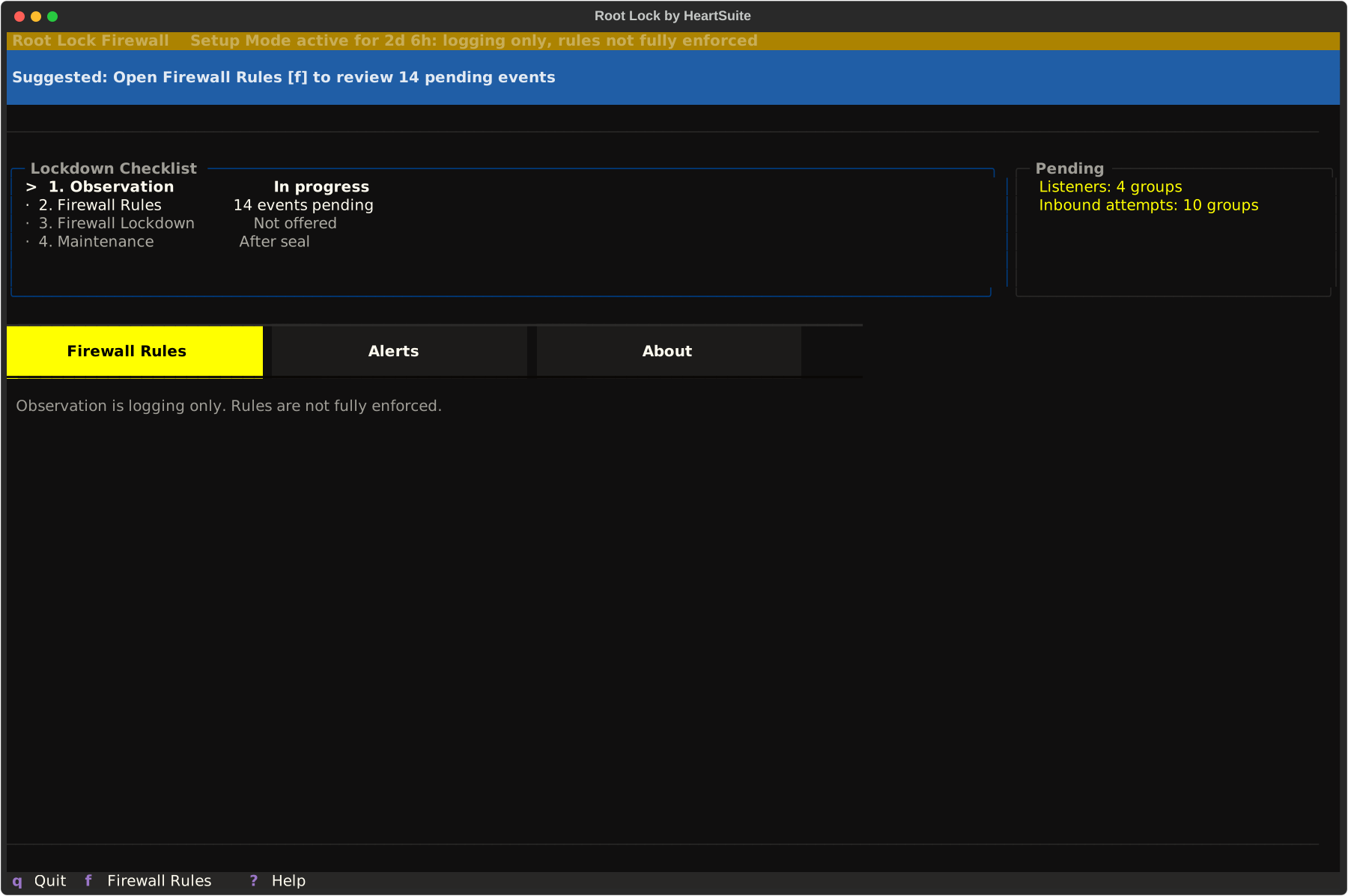
2. Open Firewall Rules
From the Dashboard, open Firewall Rules with [f].
Each pending event is something that already happened on this box during observation: a listener, an inbound attempt, a repeated source.
Firewall Rules groups related events when they share a service or origin so you are not paging through identical lines. View samples with [v] before approving a group.
[a] Approve creates an allowlist entry for that traffic, and [s] Skip leaves it for later ([s] is Skip, not Seal). Each approval is a decision you make rather than a confirmation of a choice the Dashboard already made, which is why there is no blind “allow all pending.”
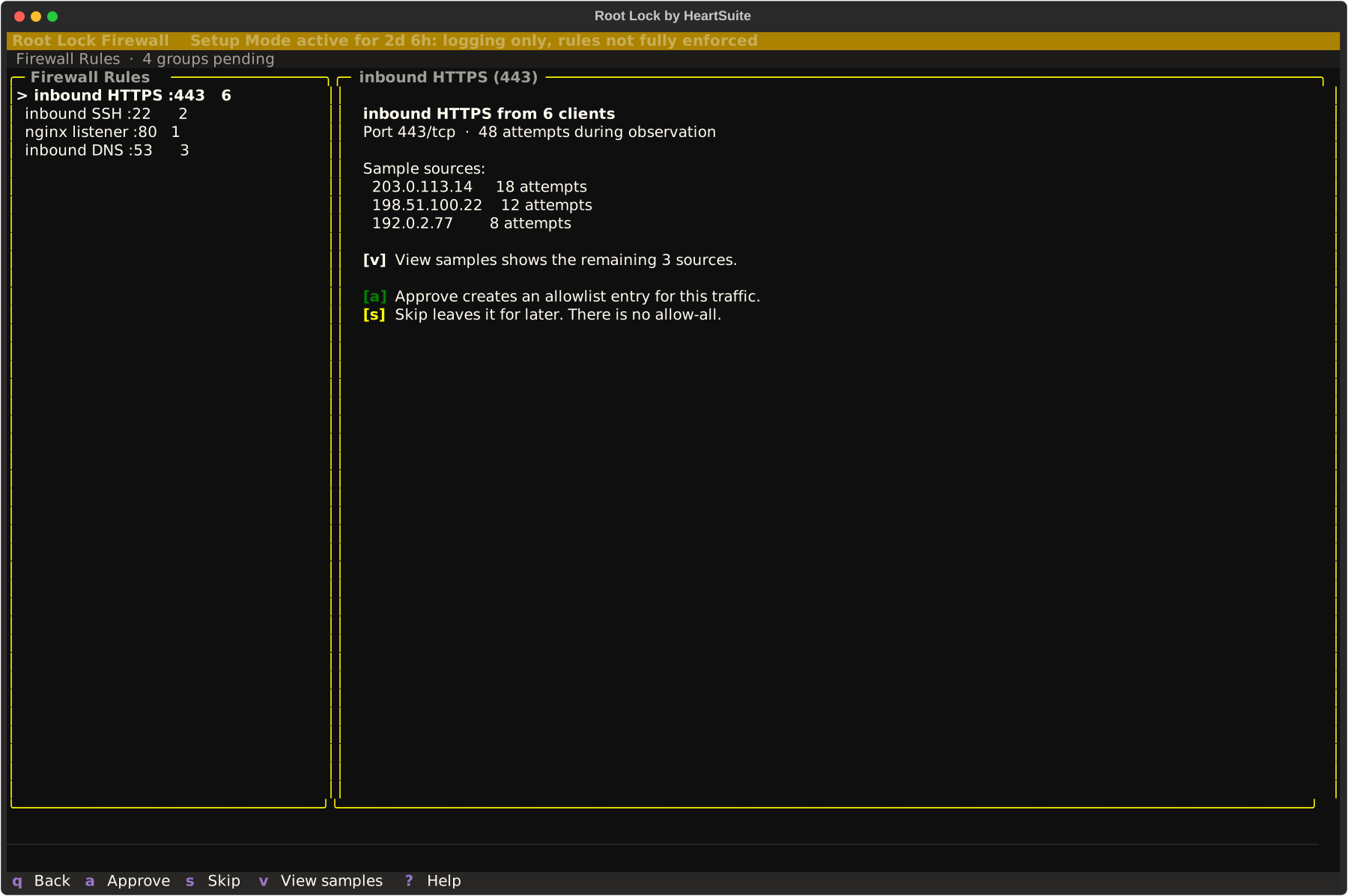
3. Empty the queue before you seal
The Suggested Next Step offers Seal Firewall with [l] only when the queue is empty and the precondition checklist also passes.
Most appliances need several days of representative traffic before that offer appears. An allowlist taught on a development host that never saw production clients will be missing the traffic those clients send.
The image already leaves a small set of ports open to any source (workload ports, and the SSH port even when no administrative SSH listener is running). Those ports never appear as review events, and sealing keeps them open, so narrow them through Maintenance once you know what the workload needs.
[l] opens Firewall Lockdown. Advance with [y] to see the review: rule counts, samples, and what the box already has for logging. Logging and SIEM destinations are not configured on this path.
4. Type YES, then reboot the host
The confirmation word is YES — uppercase, case-sensitive.
After you confirm, reboot from the console or hypervisor so Firewall Lockdown is applied with Root Lock Lockdown. The Dashboard does not reboot the host itself; once the seal is accepted, [r] shows the reboot instructions.
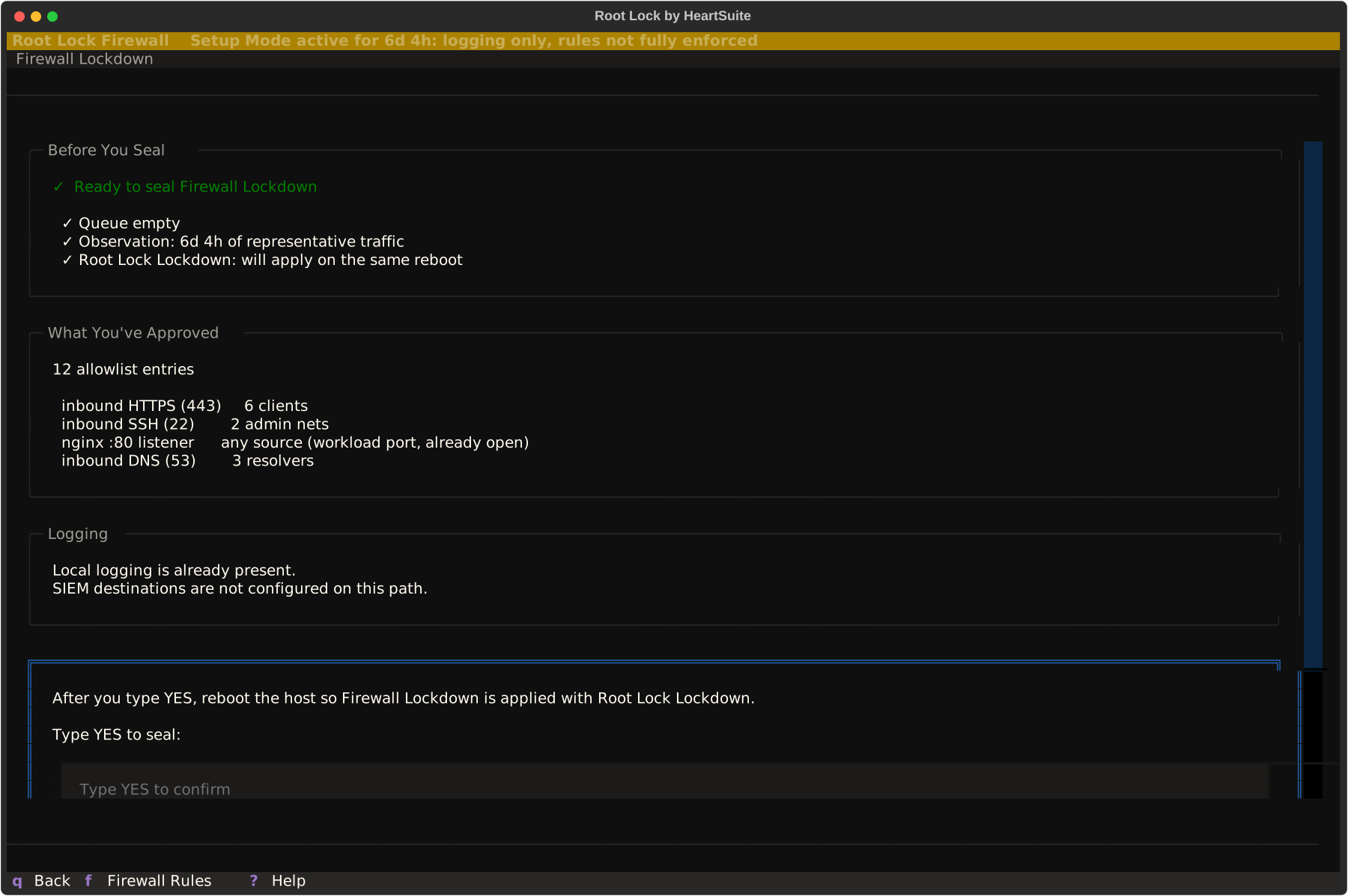
After reboot the strip is quiet when both seals are in place, and the keys that change rules are gone from Firewall Rules and from inventory. Their absence is how you know the set is sealed.
5. Inventory is read-only
After reboot, [l] opens the same Firewall Lockdown surface as inventory. It shows the allowlist that is in effect, and whether Root Lock Lockdown is present.
Advisories can flag a rule that is broader than the traffic that earned it; to narrow that rule, go through Maintenance.
6. Change only through Maintenance
To change a sealed rule, open Maintenance with [m]. Enter reduced posture with [e], then type YES.
Edit or re-observe on Firewall Rules, then seal again with [l], YES, and a host reboot. Unsealing does not reboot the host. Recovery runs on the console or serial console, not over SSH from a laptop.
See HeartSuite Firewall overview for the observe → approve → seal grammar, and Protection limits for the console recovery path.
2 - Where a host-shaped firewall belongs
When HeartSuite Firewall fits, when it sits beside Root Lock, and when a campus NGFW is still the right box for the edge.
Prototype: Content on this page reflects current design intent and will be updated as the product matures.
Overview: HeartSuite Firewall fits when the workload can live on the closed HeartSuite image the product ships as, and you want a sealed inbound allowlist for this box. Campus NGFW blades stay the specialist tool.
Where HeartSuite Firewall fits
A single-purpose workload on a closed image
A backup receiver, an internal service, a regulated workload that should run one job: the workload lives on the appliance. You observe what actually arrives, approve the sockets that job needs, and seal.
Root Lock by HeartSuite is already the operating system, so a new binary and a new outbound destination still go through the kernel allowlist.
Virtual appliance on a hypervisor you administer
QCOW2 or OVA on KVM, or the equivalent import on a commercial hypervisor. Console or serial is how you reach the Dashboard. Restrict who can open that console.
The hypervisor is part of the trust boundary. See The virtual appliance residual.
Security groups and the provider’s volumetric controls stay useful in front of any VM. HeartSuite Firewall is the host allowlist on the image after that outer layer.
Cloud firewall services stay the provider’s policy plane. Booting on AWS, Google Cloud, Azure, DigitalOcean, or Linode leaves that plane in place.
Teams who already review Root Lock queues
If the team already reviews Programs, File Access, and Internet Access, Firewall Rules is the same human act applied to this box’s sockets. That is the intended buyer. FortiManager-class estate management stays with the campus tool.
In front of other machines
v1 has no FORWARD or NAT product surface. Keep the existing edge firewall in front of a backup server, a subnet, or a pair of application hosts, or wait for an edge SKU that changes placement.
Campus, branch, or “NGFW refresh”
App-ID, TLS interception, URL clouds, SD-WAN, SSL-VPN as identity, and a central management platform stay with the specialist tool.
Using this image as a FortiGate or Cisco Secure Firewall replacement is a misfit.
Install-on-my-Ubuntu
HeartSuite Firewall ships only as the closed image, so it does not install onto a server you already run.
Root Lock on a server you already own remains the kernel product. Inbound on that server stays the OS or cloud control you already run, unless you move the workload onto this appliance.
Dedicated hardware
A hardware appliance (TPM / measured boot) is planned. v1 is the virtual image. Until hardware ships, the hypervisor is part of the trust boundary.
Shared-kernel container hosts
This appliance is a closed image with no container engine. Docker, containerd, Kubernetes, CRI-O, and Podman are not a fit on the Root Lock kernel by design: under Lockdown, Root Lock refuses the new mounts a runtime makes, so build and run those images on another host. See Root Lock Deployment Scenarios.
A WAF or API gateway requirement
Payload inspection, bot scores, and schema validation stay with a WAF in front of an allowed HTTPS port.
Alongside Root Lock
On the HeartSuite appliance image the two layers are designed to run together.
| Job | Product |
|---|
| Inbound and this-host path | HeartSuite Firewall |
| Programs, files, outbound IPs | Root Lock |
Root Lock without this image is still a complete kernel product. HeartSuite Firewall on that server is an optional SKU.
Adding a second packet-filter manager next to HeartSuite Firewall on the appliance opens a hole in the composition.
For residuals inside an approved port, see Protection limits.
3 - What sits under a closed firewall image
HeartSuite Firewall is a closed image: a stateful host filter on Linux netfilter (nft). What is in the box.
Prototype: Content on this page reflects current design intent and will be updated as the product matures.
Overview: HeartSuite Firewall is a stateful host filter on a closed HeartSuite image. You boot the image, open the Dashboard on the console or serial console, observe, approve, and seal.
The image already carries a custom kernel, a userspace stateful-inspection engine HeartSuite updates, a console TUI, and host-integrity grants. You do not allowlist those programs.
The kernel underneath requires that shape: Root Lock by HeartSuite is a custom Linux kernel, so the firewall is delivered as a closed image built on it.
Install scripts that layer the prototype onto a throwaway guest exist for laboratory use only.
Two layers, one box
Workload on this image
        │
        ▼
HeartSuite Firewall     stateful allowlist for this host's path
        │
        ▼
Root Lock programs, files, per-program outbound IPs
                        plus the kernel the filter is allowed to run on
HeartSuite Firewall owns the host packet filter. Root Lock owns what may execute and which literal outbound addresses each program may use.
On this image there is one filter owner. A second manager (UFW, firewalld, or a hand-maintained ruleset beside the product) is a composition hazard.
Root Lock’s own packet rules stay minimal: SSH scope and accept-only service permits at Lockdown. See Lockdown for that Root Lock path.
Linux netfilter on the nft path
The Root Lock kernel carries nftables. The older iptables table is absent. Public documentation therefore describes the data path as Linux netfilter, nft path. Older iptables tools on this image load no table, so a rule you thought you applied does nothing.
A userspace stateful-inspection engine drives the filter. The Dashboard writes allowlist entries. Engine internals, a vendor web panel, and a cluster GUI do not appear in the Dashboard.
HeartSuite is the update authority for that engine. Under the seal, the engine does not download external reputation or geolocation feeds.
The engine is still userspace software, which is why the two layers ship together on the image: Root Lock constrains which binaries may run and which addresses they may call.
What the seal actually is
Firewall Lockdown makes the chosen allowlist immutable on the running appliance and is applied together with Root Lock Lockdown. After reboot, the Dashboard treats the ruleset as read-only.
The seal makes the set you chose immutable. To narrow it, go through Maintenance.
Completeness of correspondence between the live filter table and the review queue is an engineering property under test. If a later engine can make the seal hashable, the product class stays a stateful host filter.
No administrative web plane
You administer the box from the console TUI. The appliance is designed without:
- a public administrative SSH listener by default
- a VPN web server as product identity
- cloud single sign-on into the filter
- vendor-static administrative accounts
The host filter’s image baseline can still open the SSH port and the usual workload ports to any source. An open port is not a running listener, but a listener you start on one of those ports is reachable from any source until you narrow the baseline through Maintenance. See Protection limits.
Those omissions are the architectural answer to the campaign class in Recent firewall campaigns. They shrink the remote attack surface of the filter. Someone who holds the hypervisor console or the rack key still reaches the box.
The virtual appliance residual
A virtual appliance runs on someone else’s hypervisor. Control of that hypervisor is control of the disk and of the serial console.
Two deliveries, same inspection class:
- a virtual appliance on a hypervisor you trust
- a hardware appliance for environments where the hypervisor is not trusted
Until hardware ships, treat hypervisor and cloud serial-console IAM as part of the product’s trust boundary. The sealed allowlist on this image still holds.
Compatibility notes
| Environment | Notes |
|---|
| HeartSuite appliance image (QCOW2, OVA) | The supported delivery. Console or serial first. |
| Root Lock kernel on a general-purpose server you built | That is Root Lock. HeartSuite Firewall is the closed appliance image. |
| Stock Debian or Ubuntu kernel | Delivery is the closed image. The nft-only constraint and the closed image assume the Root Lock kernel. |
| Cloud IaaS (AWS, Google Cloud, Azure, and others) | The virtual appliance may run there. Provider controls (security groups, Network Firewall, Azure Firewall) stay the outer layer if you use them. |
| Inline / NAT / HA pair | Later. See Deployment scenarios. |
| Shared-kernel containers on this image | This image is a closed appliance, so a container engine stays off it. Docker, containerd, Kubernetes, CRI-O, and Podman are not a fit on the Root Lock kernel by design: under Lockdown, Root Lock refuses the new mounts a runtime makes. Run the workload in a Firecracker or Kata microVM instead. See Deployment Scenarios and Containers and microVMs. |
| Windows or macOS | The filter and the kernel are Linux. |
4 - What Cisco and Fortinet incidents needed to exist
2024–2026 Cisco and Fortinet campaigns depended on management planes and extra services. HeartSuite Firewall is designed without those surfaces.
Prototype: The protections described on this page reflect HeartSuite Firewall design intent. HeartSuite Firewall is under active development. Incident facts below are taken from vendor and CISA publications, not from HeartSuite exploitation tests.
Overview: HeartSuite Firewall is a host-shaped stateful filter on a closed image.
Each incident below names what the campaign depended on, what HeartSuite Firewall does about that surface, and what it leaves to other tools. The linked vendor advisories stay the source for campaign facts.
Where an attack is application content on a port you approved, or a new binary, or an outbound callback, those dimensions belong to Root Lock by HeartSuite and a WAF.
Cisco FTD static accounts (CVE-2024-20412)
What happened. In October 2024 Cisco published a critical advisory for Firepower Threat Defense on Firepower 1000, 2100, 3100, and 4200 series. The devices contained static accounts with hard-coded passwords.
An unauthenticated local attacker who reached the CLI could log in as those accounts, read sensitive data, change some configuration, or leave the device unable to boot. SSH is enabled by default on the management interface.
Cisco listed example account names in the advisory (csm_processes, report, sftop10user, Sourcefire, SRU).
Source: cisco-sa-ftd-statcred-dFC8tXT5.
What the campaign needed. A management CLI that accepted vendor-static credentials, reachable from serial or from SSH that ships enabled.
What HeartSuite Firewall does. The image ships no vendor-static administrative accounts. You reach the box on the console TUI of an image you control, and there is no public administrative SSH by default.
What it does not cover. Console or serial remains the administrative path, so an attacker who holds a hypervisor console, or who exploits a bug in the appliance’s own console stack, reaches that path.
Cisco ASA/FTD VPN web server (CVE-2025-20333) and CISA ED 25-03
What happened. On 25 September 2025 Cisco disclosed a critical bug in the VPN web server of Secure Firewall ASA and FTD. Improper validation of HTTP(S) requests let an authenticated VPN user run code as root.
Cisco later described an unauthenticated companion (CVE-2025-20362) and stated that exploitation was attempted. CISA issued Emergency Directive 25-03. Affected features include SSL VPN and AnyConnect client-services on an interface.
Source: cisco-sa-asaftd-webvpn-z5xP8EUB.
What the campaign needed. A TLS web listener on the firewall whose job is remote access, not packet filtering.
What HeartSuite Firewall does. The appliance is designed without a VPN web server: it is a sealed host filter that you administer from the Dashboard on the console or serial console.
What it does not cover. AnyConnect-class remote access stays with a dedicated SSL-VPN concentrator.
Persistence that survived the Cisco patch (April 2026)
What happened. On 23 April 2026 Cisco published that the ArcaneDoor actor had a persistence mechanism in the FXOS base operating system of affected ASA/FTD hardware. It remained after customers upgraded to the September 2025 fixed releases.
Cisco’s recommended removal is a reimage. A reload / reboot CLI command does not clear it. Cisco documented that only a cold power cycle is an emergency alternative, and warned that pulling power can corrupt the device.
Source: cisco-sa-asaftd-persist-CISAED25-03. CISA’s September 2025 background also described ROM persistence across reboot and upgrade on ASA.
What the campaign needed. A large, long-lived appliance OS under the filter, plus a first foothold (the VPN web server class above), plus persistence below the patch you thought you installed.
What HeartSuite Firewall does. A smaller closed image, HeartSuite as the only update authority, and a custom kernel that already removes a class of in-kernel bypass primitives.
Supported recovery of a sealed box is Maintenance on the console, then a return and re-seal; that cycle unseals policy so you can change it.
What it does not cover. A hostile hypervisor, firmware, or ROM sits below the image, outside both the seal and that recovery cycle, and stays with whoever holds that path. A later hardware appliance is the planned answer for the hypervisor.
The filter engine is userspace software under Root Lock, and formal seL4-style assurance of that engine is outside this prototype.
FortiCloud SSO into other customers’ devices (CVE-2026-24858)
What happened. On 27 January 2026 Fortinet disclosed an authentication-bypass in FortiOS, FortiManager, FortiAnalyzer, FortiProxy, FortiSwitchManager, and FortiWeb. An attacker with a FortiCloud account and a registered device could log into devices registered to other accounts when FortiCloud SSO was enabled.
Fortinet states the feature is off in factory defaults, but registering the device to FortiCare from the GUI enables the toggle unless the administrator turns it off. The bug was exploited in the wild.
After SSO, Fortinet observed configuration-file download and creation of local admin accounts (audit, backup, itadmin, and others).
Source: FG-IR-26-060 (CVE-2026-24858).
What the campaign needed. A cloud identity plane that can administer the filter, turned on as a side effect of “register this device.”
What HeartSuite Firewall does. The appliance has no cloud SSO into the filter and no FortiCare-style registration step that opens an administrative identity provider on the box. HeartSuite is the update authority.
What it does not cover. Email, webhook, or syslog sent to addresses you approved is ordinary outbound traffic, governed by Root Lock’s outbound policy and whatever you configured for alerts. A bug in an update channel HeartSuite ships is a HeartSuite bug, disclosed as such.
Unsolicited inbound on a closed port
What happens on a general-purpose server. A forgotten listener or a default service is reachable from the internet. Scanners find it. Credential stuffing follows.
What HeartSuite Firewall does. During observation those attempts become review events. After Firewall Lockdown, packets to sockets that are not on the sealed allowlist are refused, including when the service runs as root.
What it does not cover. A port you approved stays open to the traffic its rule allows, and a seal that is too wide stays too wide until you narrow it through Maintenance. Volumetric floods have to be absorbed in front of the host, by the provider or cloud perimeter. See Protection limits.
5 - A sealed host filter beside a campus NGFW
What HeartSuite Firewall is, what it complements, and why it sits beside a campus NGFW rather than replacing one.
Prototype: Content on this page reflects current design intent and will be updated as the product matures.
Overview: A listening service on a Linux host accepts inbound packets unless a filter refuses them. HeartSuite Firewall is that host-path filter on a closed HeartSuite appliance: observe real traffic, approve a finite allowlist for this box, seal it.
The question it answers is: did a human approve this socket on this box, and is that set sealed?
Application identification, TLS interception, and fleet NGFW management stay with the campus tool. Root Lock by HeartSuite handles execution, files, and per-program outbound destinations on the same image.
HeartSuite Firewall and Root Lock
Three OS-level controls are unrestricted by default on Linux: file access, network communication, and program execution. Inbound reachability is a fourth default: a bound port is open to the routeable world.
Root Lock and HeartSuite Firewall share a review grammar and a seal. They close different defaults.
Root Lock is production-ready today on a server or a cloud image. You review programs, file paths, and outbound destinations, then enable Lockdown. Anything not on that allowlist is blocked at the kernel, including from root.
HeartSuite Firewall is the host packet filter for a closed appliance. You review inbound and this-host path events, then enable Firewall Lockdown. On the HeartSuite appliance image they are designed to run together.
| Aspect | Root Lock | HeartSuite Firewall | What this means in practice |
|---|
| Default it closes | A program inherits the user’s right to execute, read, write, and connect out | A listener accepts inbound packets from anywhere that can route to it | Approving curl to one IP does not close port 22. Closing port 22 does not constrain curl. |
| Placement | Kernel on the host you install | Filter on the appliance image; workload on that image | v1 is host-shaped: the workload runs on the image. |
| Inspection | Kernel grants (program, path, literal outbound IP) | Stateful packet filter (connection state + sealed allowlist) | Inspection stays kernel grants and a stateful packet filter. |
| How you reach it | Dashboard on the host | Dashboard on the console or serial console of the image | Console or serial is the administrative path. |
| Seal | Lockdown on the kernel allowlist | Firewall Lockdown on the packet allowlist, paired with Lockdown | Two seals, one maintenance path. |
| Production status | Shipped | Prototype | Do not treat this section as a GA install guide. |
For production deployments today
Root Lock is the shipped product for execution, files, and outbound destinations. Inbound on that deployment remains an OS packet filter or a cloud security group, as the Network page states.
HeartSuite Firewall is the prototype that takes inbound on a HeartSuite appliance as its job. Use it when the workload can live on the image and the team wants the same observe → approve → seal act on sockets.
Firewall Lockdown seals the packet allowlist. Root Lock Lockdown seals the kernel allowlist.
A finite observed sealed allowlist
This appliance is a finite, observed, reviewed, sealed allowlist for this host. Campus NGFW blades — application catalogs, TLS interception, URL clouds, sandbox, SD-WAN, SASE — stay the specialist tool. Enterprise NGFWs sell infinite policy surface and paid inspection.
Payload interpretation stays with a WAF in front of an allowed HTTPS port.
A virtual appliance that boots on AWS, Google Cloud, or Azure stays a host filter on that image. Provider controls (AWS Network Firewall, Azure Firewall, Cloudflare) stay the outer layer.
v1 filters this host. FORWARD and NAT stay later. Keep the existing edge box in front of other machines.
One owner of the host filter. UFW, firewalld, or a second manager on the same image is a composition hazard.
The Dashboard writes allowlist entries. Engine internals stay off the glass. There is no configuration mall and no cluster GUI as a drop-in vendor-panel replacement.
Execution, files, and per-program outbound destinations stay Root Lock. Root Lock inbound permits at Lockdown remain a thin accept path for SSH and named services.
Campus firewalls earned a second job: they became the remote-access concentrator and the administrative website. The packet filter then has to survive bugs in its own VPN web server, cloud SSO, and static accounts. That is a different tool shape from a sealed host filter with a console TUI.
Named incidents (vendor advisories, not HeartSuite testing):
| Year | What was exposed | Advisory |
|---|
| 2024 | Cisco FTD on Firepower 1000/2100/3100/4200 shipped static accounts with hard-coded passwords. A local attacker who could reach the CLI (serial or SSH, which is on by default on the management interface) could log in as those accounts. | CVE-2024-20412 |
| 2025 | Cisco Secure Firewall ASA/FTD VPN web server: crafted HTTP to the SSL VPN / AnyConnect path, arbitrary code as root, exploited as a zero-day. CISA issued Emergency Directive 25-03. | CVE-2025-20333, ED 25-03 |
| 2026 | Persistence in the FXOS base OS survived upgrade to the September 2025 fixed releases. Cisco’s recommended removal is a reimage. A reboot CLI command is not enough. | cisco-sa-asaftd-persist-CISAED25-03 |
| 2026 | FortiOS and related tools: FortiCloud SSO let an attacker with a FortiCloud account and a registered device log into other customers’ devices when that SSO toggle was on. Fortinet documents that registering the device in the GUI enables the toggle unless you turn it off. Operators then downloaded configuration and created local admin accounts. Exploited in the wild. | CVE-2026-24858 |
HeartSuite Firewall is designed without those surfaces:
- no VPN web server as identity
- no cloud SSO into the filter
- no vendor-static administrative accounts
- console or serial as the administrative path
- HeartSuite as the update authority
- seal plus a custom kernel under the filter
That is a smaller remote attack surface. A bug in this prototype remains in scope. Campus and inline FortiGate / Cisco Secure Firewall roles stay with those boxes.
See Recent firewall campaigns for the honest residual on each incident.
What HeartSuite Firewall complements
| Gap HeartSuite Firewall leaves open | Complementary control |
|---|
| Program execution, file access, per-program outbound IPs | Root Lock |
| Application content on an allowed port | WAF / application hardening |
| Ports the image left open to any source | Not produced by observation. Seal keeps them. Narrow through Maintenance. |
| Detection, correlation, incident response | SIEM, NDR, EDR hunting — forward events; the SOC console stays there |
| Volumetric DDoS and provider edge | Cloud security groups, provider DDoS, CDN |
| Inline NAT, HA pairs, SD-WAN, site-to-site VPN | The existing campus or DC firewall |
| Who may open the serial or hypervisor console | Cloud IAM, hypervisor ACL, locked rack |
HeartSuite Firewall and Root Lock address complementary OS-level defaults. HeartSuite Firewall covers inbound and this-host path at the packet filter. Root Lock covers execution, files, and outbound destinations at the kernel.
The HeartSuite appliance image, and a Root Lock server you already run
The HeartSuite appliance image is the intended HeartSuite Firewall deployment: kernel grants under a sealed host filter. The image includes the Root Lock kernel. A packet filter on a general-purpose kernel you already run stays a different product.
Root Lock on a server you already run is the shipped shape for hosts that need execution and outbound control and already have an inbound filter (OS or cloud). That remains valid.
Positioning relative to common categories
| Category | Does HeartSuite Firewall apply? | Notes |
|---|
| Host inbound allowlist on a closed appliance | Yes — the job | Observe, approve, seal |
| Stateful inspection | Yes | Connection state, not a stateless ACL box |
| Virtual appliance delivery | Yes (v1) | QCOW2 / OVA; hardware later |
| NGFW / App-ID / TLS MITM | No | Refused as identity |
| WAF / proxy | No | No payload interpretation |
| Cloud FWaaS | No | May run on IaaS; the provider’s policy plane stays there |
| Inline DC / branch edge (v1) | No | Host-shaped; no FORWARD/NAT surface |
| UFW-on-Ubuntu replacement | No | Image, not a package |
| SIEM / NDR / EDR | Complements | Forward events; the SOC stays the SOC |
How HeartSuite Firewall can be circumvented. Under Firewall Lockdown paired with Root Lock Lockdown, an attacker who already has remote root cannot rewrite the sealed allowlist. Changing it takes Maintenance on the console or serial console. SSH is not enough.
What remains is whether you approved too wide a rule, whether an allowed port is still a hole in the application, whether the filter program can be killed, and whether someone who holds the hypervisor owns the disk.
Physical presence, cloud serial, or hypervisor control returns the box to whoever holds it.
Every security system has a known way to be taken out of the picture. Being explicit about it is how customers evaluate fit.
6 - What the firewall prototype covers today
Current HeartSuite Firewall prototype scope and the development work still ahead.
Prototype: HeartSuite Firewall is under active development.
Current capabilities
The table below is the prototype contract for the appliance image: the intended observe → approve → seal path through the Dashboard, Firewall Rules, Firewall Lockdown, and Maintenance. It describes design scope rather than a generally available feature list.
| Capability | Notes |
|---|
| Closed virtual appliance | QCOW2 and OVA. Console or serial first. Delivery is the closed image. |
| Host-shaped stateful filter | INPUT/OUTPUT of this box. Workload on the image. Linux netfilter, nft path. |
| Observation → approve → seal | Dashboard Firewall Rules queue. Typed YES. Firewall Lockdown is a paired commitment with Root Lock Lockdown; the Dashboard does not run both. |
| Read-only inventory after seal | Mutate keys absent. Maintenance is the change path. |
| HeartSuite as update authority | Once sealed, the filter fetches nothing from a public CDN or reputation feed. |
| Root Lock underneath | Execution, files, and per-program outbound IPs remain Root Lock by HeartSuite — the kernel product. |
See Architecture and compatibility for the nft-path constraint and the virtual-appliance residual.
Planned
Next
| Item | Notes |
|---|
| Demonstration roundtrip | Observation → review → seal → inventory → maintenance on a real KVM image. This documentation stays Prototype until that roundtrip exists. |
| Image as the only customer path | Customers receive the closed image; install scripts stay a laboratory tool. |
Subsequent
| Item | Notes |
|---|
| Hardware appliance | Same inspection class: host-shaped stateful filter. Removes the hypervisor residual. |
| Edge SKU | FORWARD/NAT, box in front of other hosts. Changes placement. Inspection stays stateful host filtering unless application inspection is added later. |
| Self-rendered nftables | Candidate only. Would keep the same product class (stateful host filter) and could make the seal hashable. |
Product identity stays a sealed host-shaped stateful filter. App-ID catalogs, TLS interception, URL clouds, sandbox blades, SD-WAN, SASE, SSL-VPN concentrator, cloud firewall / FWaaS, proxy / WAF, a vendor-panel replacement, and UFW as a second manager stay outside that identity.