Python should not inherit every script's rights
If python3 may use the network, every Python script inherits that. Secure Script Launchers give each script its own allowlist entry.
Overview: Without Secure Script Launchers, every Python, Perl, or PHP script would share the interpreter’s permissions — if python3 is allowed to access the network, every Python script can access the network. Secure Script Launchers solve this by giving each script its own allowlist entry, so you control exactly what each script can do. The Dashboard presents this when script interpreters are detected on the system.
In this section
Secure Script Launchers is row 4 on the Lockdown Checklist, and the Suggested Next Step stays on Launchers ([s]) while interpreters are pending; skipping activation leaves the row incomplete. Once launchers are activated, or the row is not applicable, the Suggested Next Step goes to File Access ([f]) if that queue still has items — see Allowlisting Basics.
1 - One interpreter, many script allowlists
Without launchers, every script shares the interpreter’s permissions. Launchers split that so an approved python3 cannot run an unapproved script.
Overview: Without Secure Script Launchers, every script run by an interpreter (Python, Perl, PHP) shares the interpreter’s permissions. If python3 is allowed to access the network, every Python script inherits that access. Secure Script Launchers solve this by giving each script its own allowlist entry.
Why allowlisting the interpreter is not enough
Interpreter programs (Python, PHP, Perl, Bash) execute code from files. When you allowlist python3, you grant permissions to the interpreter — and every script it runs inherits those permissions. A malicious Python script would have the same file and network access as your legitimate scripts.
graph LR
    subgraph without["Without launcher — interpreter is the unit of control"]
        P["python3\none allowlist entry"] --> SA["script_a.py"]
        P --> SB["script_b.py"]
        SA --> PA["network ✓  files ✓"]
        SB --> PB["network ✓  files ✓"]
    end

    subgraph with["With Secure Script Launcher — each script is the unit of control"]
        L["hs-python-launcher"] --> SA2["script_a.py\nown allowlist entry"]
        L --> SB2["script_b.py\nown allowlist entry"]
        SA2 --> PA2["network ✓"]
        SB2 --> PB2["no network ✗"]
    end

    style P fill:#fdd,stroke:#c44
    style SA fill:#fdd,stroke:#c44
    style SB fill:#fdd,stroke:#c44
    style PA fill:#fdd,stroke:#c44
    style PB fill:#fdd,stroke:#c44
    style L fill:#d4f4dd,stroke:#2a7a40
    style SA2 fill:#d4f4dd,stroke:#2a7a40
    style SB2 fill:#d4f4dd,stroke:#2a7a40
    style PA2 fill:#d4f4dd,stroke:#2a7a40
    style PB2 fill:#d4f4dd,stroke:#2a7a40
Per-script allowlist entries
Secure Script Launchers create a wrapper that applies the individual script’s allowlist entry instead of the interpreter’s:
- Each script is treated like a standalone program with its own permissions
- One script can have network access while another cannot
- Under Lockdown, the interpreter itself can stay blocked, so only allowlisted scripts run
Using launchers
Root Lock by HeartSuite provides Secure Script Launchers for each supported interpreter (e.g., hs-python-launcher). Once activated via the Dashboard’s Launchers ([s]), every call to that interpreter automatically routes through the launcher — applying per-script permissions without any change to how you run scripts.
See Configuring Script Launchers for the activation steps.
2 - Turn on per-script allowlisting
Activate Secure Script Launchers for Python, Perl, and PHP so each script is reviewed on its own, not as the interpreter.
Overview: An interpreter like Python, Perl, or PHP executes many different scripts — without additional control, a single allowlist entry for the interpreter applies to all of them equally. Secure Script Launchers identify the specific script being executed and apply a separate allowlist entry for it, giving each script its own file and network permissions. Launchers ([s]) on the Dashboard shows detected interpreters and activates launchers in one step.
Activating launchers
From the Dashboard, select Launchers ([s]). The Dashboard shows two sections:
- Script Launcher Status — how many interpreters were detected and how many launchers are pending activation
- Detected Interpreters — the list of interpreter paths found in the activity log, with their current launcher status
When launchers are pending, the Dashboard shows:
2 interpreter(s) found across 47 log event(s).
2 launcher(s) available but not yet activated.

[a] Activate   [s] Skip
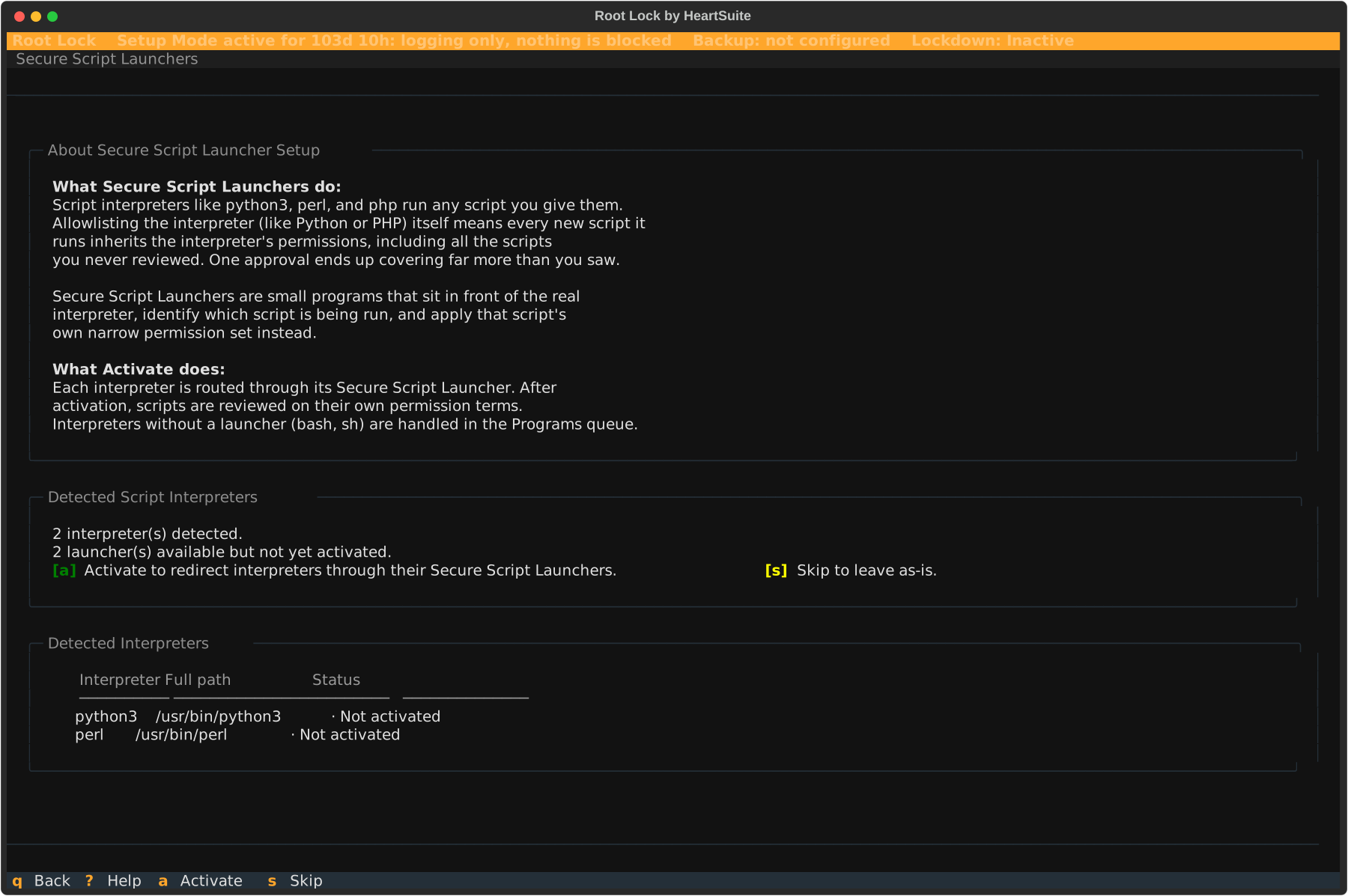
Press [a] to activate all pending launchers at once. Root Lock by HeartSuite registers each interpreter with its Secure Script Launcher — from this point forward, every call to that interpreter automatically routes through the launcher, applying per-script permissions.
After activation, the Dashboard confirms which launchers were activated:
Activated 2 Secure Script Launcher(s): python3, perl.
Each interpreter now routes through its launcher. Scripts using
these interpreters will be reviewed on their own permission terms.
Press [q] to return to the Dashboard. The Lockdown Checklist marks 4. Secure Script Launchers complete.
If no script interpreters are detected
If none of the known interpreters have appeared in the activity log yet, the Dashboard shows:
No script interpreter log events detected.
None of the known interpreters have appeared in the activity log yet.

Proceed without activating launchers.
If your system does not use script interpreters, you can proceed without launchers, and the checklist row reads Not applicable.
Skipping launcher setup
Press [s] to skip without activating. Root Lock notifies you:
Skipped. Interpreters without a Secure Script Launcher
activated will be blocked under Lockdown.
Skipping leaves the checklist row incomplete, so the Suggested Next Step stays on Launchers ([s]) while interpreters are still pending. You can return to Launchers at any time to activate them before Lockdown.
Testing a launcher directly
Before or after Dashboard activation, you can run a script through a specific launcher directly to verify it works under its own permissions:
# hs_python3 /path/to/your-script.py
This applies the script’s allowlist entry rather than the interpreter’s. Before activation, running the same script with python3 directly uses the interpreter’s broader permissions; after activation, that call routes through the launcher as well. This is useful for verifying per-script permissions in isolation before relying on them in Lockdown.
After activating launchers, return to the Dashboard. The Suggested Next Step directs you to file access allowlisting via the File Access queue ([f]) if that queue still has items.
3 - Which script launchers ship in the box
Secure Script Launchers included with Root Lock. The Dashboard offers them when it finds the matching interpreter.
Overview: Root Lock by HeartSuite ships with Secure Script Launchers for common interpreters. The Dashboard presents these when the corresponding interpreters are detected on the system.
Available launchers
- Python 3 (
hs-python-launcher) - Python 2 (
hs-python2-launcher) - Perl (
hs-perl-launcher) - PHP (
hs-php-launcher)
For questions about launcher support for other interpreters, contact support@heartsecsuite.com.