HJFS on a stock kernel
Prototype: Content on this page reflects current design intent and will be updated as the product matures.
Overview: HeartSuite Joint File System (HJFS) isolates files inside the host filesystem on a stock kernel, because enforcement sits in the filesystem open() path rather than in a custom kernel.
HJFS sits on an existing host filesystem, and the current prototype implements the core file organization without modifying the host filesystem’s code directly.
Integration and vendor cooperation
HJFS integration involves two steps:
- FS source code integration: A minimal amount of HJFS source code is integrated into the file system’s
open()call. The scope of changes is small. - Kernel registration: The HJFS-modified file system must be registered with the kernel. On Linux, this is a standard operation. On Windows and macOS, it requires cooperation from Microsoft or Apple respectively. Kernel registration is planned for a subsequent release.
OS support
HJFS is designed to work on Linux, Windows, and macOS.
| Platform | Notes |
|---|---|
| Linux | Most straightforward path. Registering a modified file system with the kernel is a standard Linux operation. |
| Windows | More involved. Requires cooperation from Microsoft to register the HJFS-modified file system with the Windows kernel. |
| macOS | More involved. Requires cooperation from Apple to register the HJFS-modified file system with the macOS kernel. |
Partial deployment: portable HJFS drive
Adding an HJFS-formatted disk or USB drive to a Windows computer isolates programs installed on that drive. Files on the HJFS volume stay isolated per program. Programs on the rest of the computer stay on NTFS until NTFS itself is made HJFS compliant.
Application compatibility
HJFS basic protection requires only OS-level changes, so existing application software runs unchanged for the vast majority of programs.
Applications hard-coded to access global system paths outside their own storage area (such as /usr or /proc) would need minor adjustments. The scope of such changes is expected to be small.
See Advanced protection for the level that does require application modifications, and what it adds in return.
Container compatibility
Containers running on an HJFS-compliant host filesystem benefit from the same per-program file isolation as native processes. Each containerized program is confined to its own storage area. Container orchestration and scheduling are unaffected.
Network access control
Root Lock by HeartSuite provides network access control today with kernel-level gating of outbound connections, and on a Root Lock kernel HJFS and Root Lock can share the host.
HJFS network mediation is planned; until it ships, file isolation on a standard kernel works without it. See Roadmap.
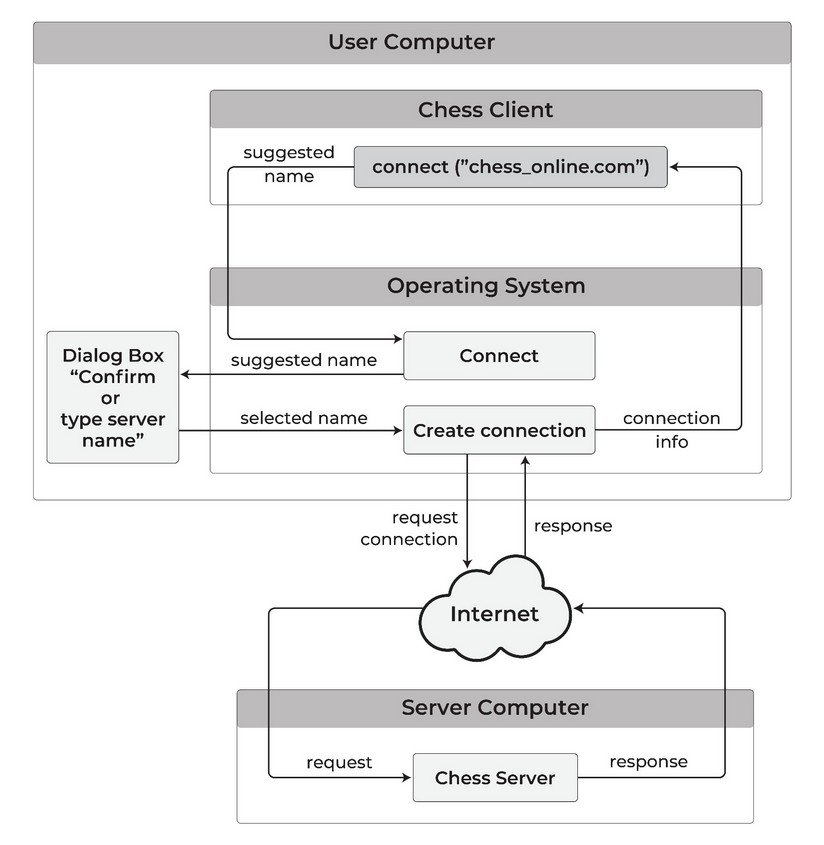
When that HJFS path ships, each new outbound connection requires explicit approval rather than a static list:
- Desktop: you approve each new connection through an OS confirmation dialog.
- Server: access is governed by pre-approved utilities or admin-defined policies, without per-action prompts.
Planned desktop path:
Blocking simulated user input
HJFS-compliant OS distributions disable the ability for a program to simulate user mouse clicks or keypresses in ordinary user sessions. Without this, a malicious program could simulate a user emptying the trash, approving a file open dialog, or confirming a network connection — faster than a user can observe or stop them.
Local deployment requirement
HJFS must run locally on every machine it protects, because it applies file isolation at the filesystem layer of the local host. A program running on a machine without HJFS stays on that machine’s native filesystem, regardless of where its data is stored, so remote or cloud storage alone does not isolate it.
Feedback
Was this page helpful?
Glad to hear it! Please tell us how we can improve.
Sorry to hear that. Please tell us how we can improve.